
Solved!
Go to SolutionXPS 15 change Home and End keys to Fn + Left and Fn + Right
Hi everybody!
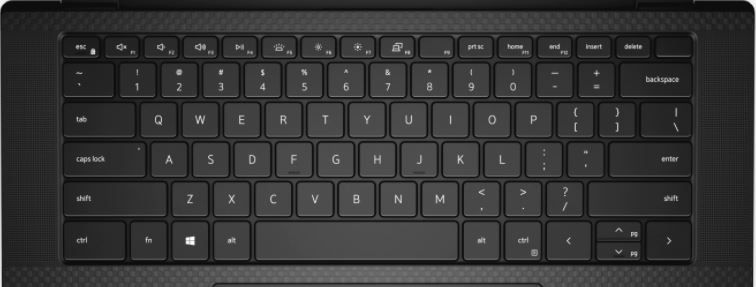
I find the "home" and "end" keys in the upper right corner of the keyboard rather annoying.
Can I reassign them respectively to "Fn + Left" and "Fn + Right"?
I use a Dell XPS 15 9500.
Thank you!
13299
4
Posted November 25th, 2020 01:00
@exgen wrote:
Why?! Why remove keys combinations?!
I'd really like to hear what Dell has to say about this. I'm trying really hard to find any plausible rationale behind it, and the only thing that makes some kind of sense is that the keyboard people at Dell went through a thought process such as this: "Some XPS users don't like the Fn-Left and Fn-Right shortcuts, so let's ditch those and go with Fn-F11 and Fn-F12 instead."
Since the factory settings are totally impractical, and that the Fn key cannot be used by key mapping tools, here's what I did: using Microsoft's PowerToys, I remapped F9 to Home and F10 to End.
I never use Fn-Lock; also, F9 and F10 are the least used function keys in the software I use. Also, the fact that the F9 physical key has no other text printed on it makes it easier to spot visually. So it's not great, but it's at least workable... as long as I stay in Windows. I plan on having a Linux partition, and I'll need to replicate the solution in some way
Again, I really hope Dell takes our disappointment and frustration into account and offer a firmware upgrade that restores the good old Fn-Left and Fn-Right, which could be turned on all the time, or even better, switchable via BIOS settings.
12746
18
Posted June 10th, 2020 10:00
@hinz Unfortunately no. This keyboard layout change (for the worse, in my opinion) was first implemented on the XPS 13 models a few generations ago. Older XPS 13s used Fn+Left/Right for Home/End, and then suddenly a version came out that moved Home/End to the right AND disabled Fn+Left/Right for this purpose. Multiple threads have been created to complain about this issue, each with multiple users active. And as a heavy user of keyboard shortcuts, I absolutely sympathize. And now it seems that this design has been implemented on the new XPS 15 and the new XPS 17.
Just last week I found an internal escalation path within Dell for "product quality" issues, so I wrote up this issue and included links to the various existing threads about user complaints over this, since some people have returned their XPS 13s over this or stated that this single issue was preventing them from buying it. (It might prevent me from buying it too, frankly.) I don't know if my write-up will result in any changes, but I hope so, because it would be absolutely trivial for Dell to provide a firmware update that allowed Home/End to be triggered EITHER using the keys marked as such OR via Fn+Left/Right. Some Lenovo keyboards already work this way. They have Home/End keys on the top row, but Fn+Left/Right also works for this purpose, even though the Left/Right keys are not actually marked to indicate that.
But this would require a firmware update from Dell, since the OS actually can't "see" the Fn key itself. It can only see whatever command the system sends to the OS as a result of pressing Fn and some other key. In the meantime, the best you could do would be to use an application like AutoHotKey to map Home/End to some other key combination, maybe Ctrl+Alt+Left/Right or something, assuming that wouldn't conflict with some other keyboard shortcut in the applications you use.12695
11
Posted June 18th, 2020 13:00
Just wanted to gives up to Dell if anyone cares that they probably lost a customer over this, can't wrap my head around how anyone could have tough this change is a good idea... Whenever I have to use a laptop/keyboard with home/end far from the direction keys the first thing I notice is how annoying it is, my productivity plumet as soon as I have to manipulate text (which I do for a living).
12540
9
Posted July 10th, 2020 07:00
Has DELL corrected this issue? As a software developer, easy to access HOME and END buttons are critical. If not addressed, I will likely forego purchasing this model, or even purchasing a DELL laptop at all.
12408
6
Posted July 23rd, 2020 07:00
Xps 9500 (2020) here. Sadly, this feature is still not implemented, Home and End keys are still top right, very (very) inconvenient. Fn+left / Fn+right does not do Home / End.
12412
8
Posted July 23rd, 2020 11:00
FYI all, I just contacted Dell tech support and asked them to escalate this feature request to the firmware team. For such an expensive laptop, let's hope they take it seriously!
12417
8
Posted July 23rd, 2020 11:00
+1 desperately needed feature. Just bought new XPS15 9500 (2020) after having been using an XPS15 9550 (2016) since April 2016; this change is mega-disruptive... There's currently nothing assigned to Fn+<- or FN+-> -- @Anonymous why not create a firmware option that allows home and end to be enabled for those keys in addition to F11/F12 locations? This would help power-users / developers like me - and we are by far the most likely kinds of people to buy an XPS15 - who else needs all this power with a mid-grade GPU aside from someone either doing a ton of heavy-duty development or heavy-duty content creation? Gamers will want more GPU, so in both cases XPS15 users are MUCH more likely to be power-users than average, and power-users are MUCH more likely to care about this kind of thing...
12306
3
Posted August 3rd, 2020 06:00
Same problem here with my new Precision 7540 workstation. What makes it worse for me is that the "end" key replaced the "insert" key which I used a lot on my old Precision laptop. Dell, please update this
11754
5
Posted September 27th, 2020 03:00
I'm also a developper and I just can't work decently without those keys, it's a **bleep** shame how could someone approve this ? heads must roll and a solution has to be found !
If I can't find a very decent workaround today I'll just send my laptop back.
@Anonymous
Is there a way to have some visibility here ?

DELL-Cares
Moderator
•
27844 Posts
•
748 Points
7439
0
Posted February 25th, 2021 10:00
The keyboard layout is working as designed. The Home and End keys are clearly visible on the Dell XPS 15 9500 sales site. The online XPS 15 9500 Setup and Specifications PDF page 22 also shows this.
#IWork4Dell
For all non-technical issues that require your private data, we must communicate via a private Direct Message
Dell Partner GEM Program, Out of Warranty Support options, No free goodwill repair, Get a copy of your Dell invoice