
未解決
SCGとUCCの設定時に入力する情報に関して
SCGとUCC設定時にいくつか名前・メールアドレス・電話番号を入力する部分があるのでが、こちらは何に使用するかご教授いただけないでしょうか。
1.SCG初期構築時にadminのパスワード設定時に名前・メールアドレス・電話番号がありますがこちらは何に使われるのでしょうか。

2.SCG初期構築時の「Set up and configure your secure connect gateway」にPrimary support contactという項目がありますが、これはSCGにてサポートが障害検知時にサポートからお客様への連絡する際の連絡先という認識ですがあっておりますでしょうか。

3.UCC Edge(ISOでHyper-V上に)構築する際の「UCC Edge First Time Configuration」ウィザード内でCreate User Accountという項目があります。ここではWebUIのユーザを作成するかと思いますが、この時に名前、Emailを入力欄がありますがここの名前とemailは何に使われるのでしょうか。

0
0
投稿済み 2026年6月29日 15:33
1.の名前・メールアドレス・電話番号がSR作成等に使われないことは理解しました。
SCG5.3400.16をデプロイしたときにこのバージョンでは名前・メールアドレスは必須になっているようです。
この場合SR等の作成に使用しないので基本的にここの名前・メールアドレスは管理上入れるだけでどこにも使われないという認識であってますでしょうか。

3.こちらUCCもユーザを作成する際必須の名前(これはユーザ名とは別)とEmailは管理上入れるだけでどこにも使用はされないという認識であっていますでしょうか。
※SCGもUCCもユーザ名とは別に指定する名前とEmailは入力はするが何にも使用されずこのメールアドレスにDellサポートやSCG/UCCからメールが飛んだり何かに使われたりしないかを気になっております。
追加でもう1点教えてください。
4.SMTPサーバの設定内にDefault Watchlistという項目があります。画面を見るとここに指定したメールはCCで送付されるとありますが、その場合Toの送付先はどこで指定できるのでしょうか。

0
0
投稿済み 2026年7月2日 06:31
この場合SR等の作成に使用しないので基本的にここの名前・メールアドレスは管理上入れるだけでどこにも使われないという認識であってますでしょうか。
少なくとも障害時のDellサポートからの連絡用としては利用されません。
動作確認は出来ていないのですが、(後述のUCCの動作を鑑みると)SCGのヘルスチェックレポートの送信先などに含まれる可能性はありそうです。[参考]
SCGの連絡方法設定について
SCG導入における連絡先について参考として記載した上記スレッド情報をみると、(ayasさんの回答とは異なってしまいそうですが)最初のご質問の2.に関する情報も、障害検知時にサポートからお客さまへ連絡する際に利用されることはないはずです。
3.こちらUCCもユーザを作成する際必須の名前(これはユーザ名とは別)とEmailは管理上入れるだけでどこにも使用はされないという認識であっていますでしょうか。
4.SMTPサーバの設定内にDefault Watchlistという項目があります。画面を見るとここに指定したメールはCCで送付されるとありますが、その場合Toの送付先はどこで指定できるのでしょうか。
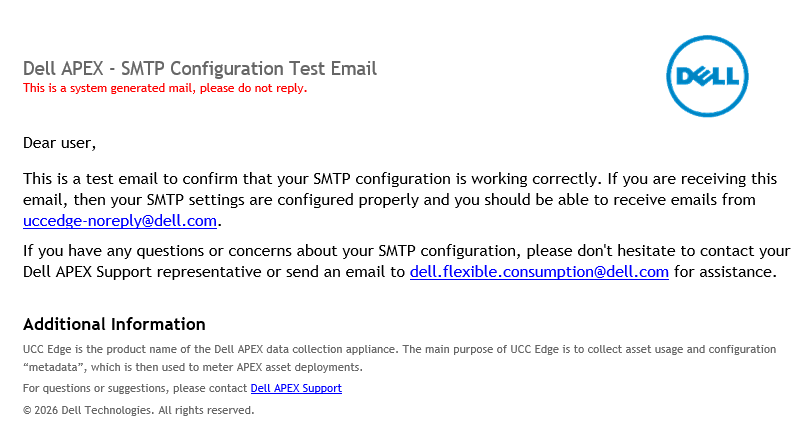
ラボ環境をつくって確認してみましたが、[TEST]をクリックすると、UCC Edgeのインストール時にCreate User Accountで指定したメールアドレスがToに入った「UCC Edge SMTP Configuration Test」というメールが送信されてきました。
また、UCC EdgeのGUIからMy Profileに設定されているメールアドレスを変更すると、その変更先にメールが届くようになったので、インストール後のToの送信先はMy Profileから指定できることが分かりました。
[飛んできたメール]
[FYI]
自分の環境ではどうしてもWatchlistに入れたメールアドレスに対して[TEST]をクリックしてもメールが飛んできませんでした。
UCC Edge 2.2の時代にはそもそもSMTPの設定項目もなかったことも前のバージョンにログインしてわかったのですが、この新しいSMTPの機能に関してはまだ謎が多いです・・・

ayas
Community Manager
•
7537 投稿
•
68231 ポイント
0
0
投稿済み 2026年6月29日 08:34
Kingさん
1.SCG初期構築時にadminのパスワード設定時に名前・メールアドレス・電話番号がありますがこちらは何に使われるのでしょうか。
→マニュアルにもDuring installation, the customer sets the admin username (default: admin) and password. Dell does not have access to or visibility of these credentialsとあり、
こちらの情報を使ってのSR作成などはなく、主にSCGの設定変更への作業を可能にするものになります。
Secure Connect Gateway 5.x — Virtual Edition Deployment Guide
Page41
Admin account for secure connect gateway WebUI :
● During installation, the customer sets the admin username (default: admin) and password. Dell does not have access to or visibility of these credentials.
● The admin account is used to administer the secure connect gateway. Example, Add, Edit, Remove managed devices, initiate a PowerEdge/iDRAC log collection, so on
SCG 5.30 管理者アカウントの作成について
SR作成で使用するのはアカウントプロファイル情報が使われるためこちらの設定での情報が使われるわけではないです
2.SCG初期構築時の「Set up and configure your secure connect gateway」にPrimary support contactという項目がありますが、これはSCGにてサポートが障害検知時にサポートからお客様への連絡する際の連絡先という認識ですがあっておりますでしょうか。
→その認識で正しいです。
Secure Connect Gateway REST API Guide
Primaryで検索すると監視対象のDeviceGroupに設定されているのはprimary and secondary support contactsになります。
3.UCC Edge(ISOでHyper-V上に)構築する際の「UCC Edge First Time Configuration」ウィザード内でCreate User Accountという項目があります。ここではWebUIのユーザを作成するかと思いますが、この時に名前、Emailを入力欄がありますがここの名前とemailは何に使われるのでしょうか。
→ご認識の通り、Create User AccountではWebUI ログイン用アカウントの作成で、名・Email はそのアカウントの属性です。Dell との接続自体は別ステップ(Register)で PIN +アクセスキーにより確立されるため、UCC Edge を正常動作させるには PIN +アクセスキー登録を行えば十分です。
Dell UCC Edge 3.0.X Getting Started Guide
Page5
Before you can log in to the application, you must complete the first-time configuration wizard. This wizard allows you to restore, update license key, create user account, register and set timezone.
4.Follow the instruction on the wizard to register the UCC Edge with Dell. You can skip this step during the process if necessary, but you must register UCC Edge using a PIN and access key with Dell Technologies to enable remote support connectivity. The configuration can also be performed from within the application by selecting the Settings icon, and then Dell Connectivity. See the Generate Access key and PIN support page for more information.