
Solved!
Go to SolutionR
rllanes2019
1 Rookie
•
17 Posts
•
2 Points
1
489
July 9th, 2025 22:22
PowerEdge R420 not allowing to install Windows Server 2012 R2 asking for drivers in the installation process
Hi there
I have a PowerEdge R420 not allowing to install Windows Server 2012 R2 I have the OS in a flash drive I begin the installation using the F11 option Boot install and it does not detect any media to install the OS and ask for drivers. I have provided some drivers found in the web but to no avail. The RAID card is disabled I will configure that later after the OS installation. When I try to use Lifecycle it only give the option to install 2008 and it does not detect the usb drive to pull the image. What can I do?. Thanks in advance
0
0
Posted July 11th, 2025 21:56
For sure your SSD is vissible within the PERC configuration but we need to finde out if or why its nots vissible for your Windows OS Installier.
To rules this out try to load a known to work OS like ESXi or Ubuntu which ships with the needed driver for sure.
You get a stone aged server which never gets any kind of updates and with a unknown konfiguration.
If you download your Windows ISOs from Microsoft? I ask because in my carrer as a Moderator within a VMware forum we got 4 dozen threads within 15 years where a broken download and a garbled ISO always stops during installation when query for the device targets.

0
0
Posted July 10th, 2025 04:55
Hello thanks for choosing Dell and welcome to our community.
It seems like you have outdated driver pack.
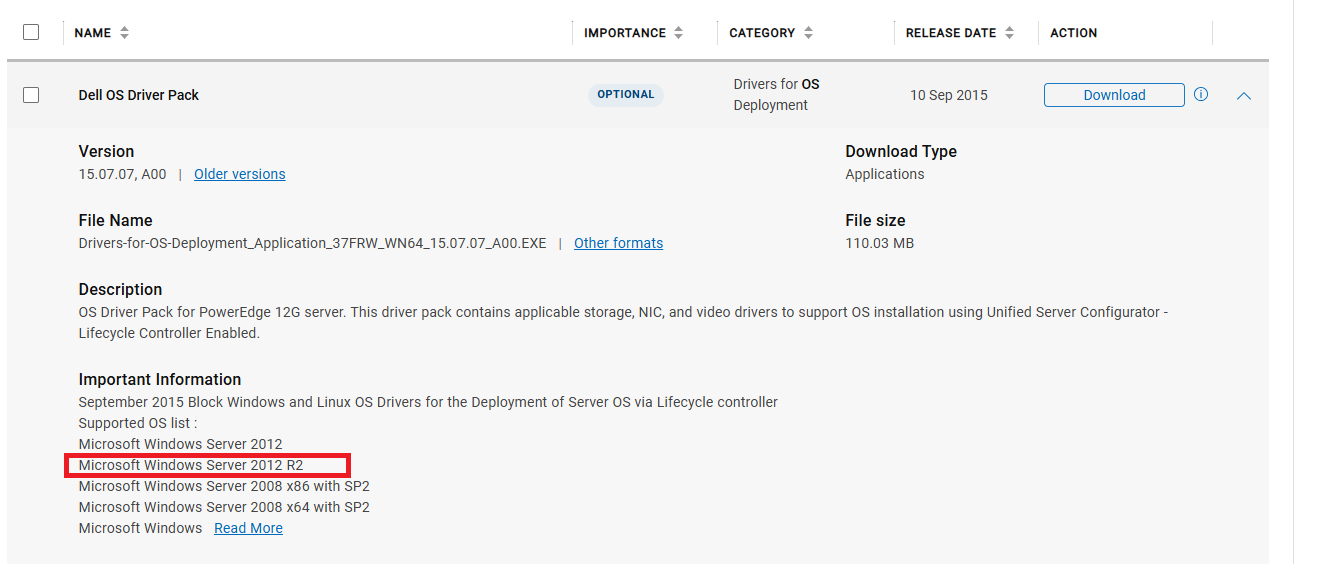
We ask that you install the latest and LCC will have an option for 2012.
Could you please send us your service tag for further support? https://www.dell.com/community/en/direct-messaging
Social Media and Communities Professional
Dell Technologies | Enterprise Support Services
#IWork4Dell
Did I answer your query? Please click on ‘Mark as Accepted Answer’. ‘Thumbs up’ the posts you like!0
0
Posted July 10th, 2025 07:54
Oh well.....
when trying to install something on a RAID you should create a RAID(Virtual Disk) first and please ensure that the intitialization was finshed. Otherwise select "Fast Init"
If you try to install a OS that comes earlier than your hardware please expect that drivers for "unknown" Hardware are needed.
- Download the needed OS Driver for the hardware. Most likely for the PERC RAID Controller. Extract the package and store the files on a usb thumb
or
- use the LCC to install the OS which can inject the needed Drivers if you have the OS_Package within the LCC/iDRAC up to date. Than its some kind of piggyback.
Regards,
Joerg
0
0
Posted July 10th, 2025 13:48
First of all I appreciate your help a lot and also the quick reply. I'm new to server installation and still in the process of understanding the main difference between regular PC and server install. That is why I'm setting this one without the RAID controller at first. I have a SSD connected to the internal SATA port. I want to install the OS in there. It's been detected by the BIOS. I dont know what is the best installation option for this scenario, either the F11 boot menu or the F10 Lifecycle controller. To your points, when I try the LCC the windows 2012 R2 is not showing. When I tried the F11 Boot install then I get the error of missing drivers on the installation. I tried to put the Dell OS driver pack on the pendrive but that did not work either, maybe I did it wrong. If is not too much to ask can you guide to a step-by-step installation. I did not update my LLC because is at the latest version. Thank you
0
0
Posted July 10th, 2025 14:27
Hello,
You need to update the OS driver pack that Young provided. This will provide the WS2012R2 drivers needed for installation.
Put the exe file: Drivers-for-OS-Deployment_Application_37FRW_WN64_15.07.07_A00.EXE
On to a thumb drive.
Boot to F10 and supply the exe in the Update section and apply
Save exit and power off.
Insert your thumb drive with the OS ISO
Boot to F10 and do the OS Deploy wizard. It is menu driven to help you install the OS.
DELL-Charles R
Social Media and Communities Professional
Dell Technologies | Enterprise Support Services
#IWork4Dell
Did I answer your query? Please click on ‘Accept as Solution’. ‘Thumbs up’ the posts you like!0
0
Posted July 10th, 2025 14:30
The Drivers-for-OS-Deployment_Application_37FRW_WN64_15.07.07_A00.EXE is for uploading into iDRAC/LCC similar to a BIOS upgrade or LCC/iDRAC it self. Same is true for the Diagnostics.
Iam unsure that you can extract the PAYLOAD of the Drivers-for-OS-Deployment_Application bundle but you will have a hard time to locate the right folder. If you copy ALL folders onto a USB stick and provide these during Windows installation iam unsure if the Installer is smart enought and can work recurisve through all of the folders.
Note:!
The *.xml within the payload will give you the info... the windows driver for a Hardware PERC is located in the "XYPYC" folder.
I habe more in mind that you have "show" the path within the MS Installer.
Anyways... if you have ther PERC S110 the windows driver is locatet
https://dl.dell.com/FOLDER01758009M/4/SAS_RAID_DRIVER_WS2012R2_S110_3.2.0-0008_A00_ZPE.exe
For a real HW PERC i was unable to locate the windows driver.
Regards,
Joerg
(edited)
0
0
Posted July 10th, 2025 16:06
Thanks again guys. This is what I have so far


I have tried to update the system with the Dell Server driver pack and I can't because my USB drive is not detected. I have try the usb in NTFS and FAT partition system, I have tried in front and back USB. This is the same USB that I've been using to install the OS using F11 and it gets detected fine in the BIOS and runs the OS installation process until the point that asks for the drivers.
Believe me guys something odd is happening in here. I even took the SSD out, put it on a SATA/USB adapter set it up as a bootable device and install disk and the installation stops in the same point asking for drivers but it does not specify which drivers. I losing my mind in here. Thank again
0
0
Posted July 10th, 2025 16:20
If a OS installer doest find any kind of a "disk" it will ask for the a driver to get the storage controller working.
I'll bet that Windows 2016/22 comes with a inbuild driver for a PERC S or H.
Otherise i already post the driver for PERC S and the PERC H is within the payload\mas021.zip\XYPYC\w2008r2_64 folder when you extract the large OS-Deployment package. Place both folders on a thumb drive and than point onto it when the Installer tell you to install the driver.
I havent found your STAG within the current Dell Database so i cant tell you if your server shipped with a PERC S or H. Also within the BIOS you can select RAID or AHCI.
0
0
Posted July 10th, 2025 17:01
Hello,
For the firmware update not seeing the USB drive, try the rear UBS ports and also try 4G or 8G USB drive.
You'll want to go into the System Setup and set boot mode to UEFI before installing OS.
Boot to <F2> System Setup > System BIOS > Boot Settings: select UEFI. Save and exit.
Then boot to <F10> run the OS Deploy.
This is for after you have the OS installed and you are ready to update firmware.
As of the end of 2022 the 12th generation platforms reached the end of support life.
You can use this Server Update Utility (SUU) to update your firmware to the latest it has at end of support.
Windows Server 2012 R2
Release date: 14 Jan 2019
DELL EMC Server Update Utility, Windows 64 bit Format, v.19.01.00
1. Download the Full ISO file.
2. Use ISO mounting software and mount the downloaded iso image.
3. Browse to the folder.
4. Double Click suulauncher.exe.
DELL-Charles R
Social Media and Communities Professional
Dell Technologies | Enterprise Support Services
#IWork4Dell
Did I answer your query? Please click on ‘Accept as Solution’. ‘Thumbs up’ the posts you like!

Origin3k
6 Operator
•
2424 Posts
•
12408 Points
0
0
Posted July 12th, 2025 10:41
@rllanes2019
Ok, because of the ESXi Installer detects and show the 32TB RAID on your H330 the Server and its config should be fine and ready to go.
Please download the MS ISO from Microsoft again and verify the checksum adress. You can do that with powershell.
Regards,
Joerg