
Solved!
Go to SolutionR450 RAM arrangement 1CPU+2*64GB+6*32GB
Hi Guys,
Definitely need some helps here, is it possible to mix the RAM with Size in R450
Power Edge R450
Setup
1*CPU
2*64GB RAM
6*32GB RAM
Slot in arrangement
| Slot | Module |
| ---- | ------ |
| A1 | 64GB |
| A2 | 64GB |
| A3 | 32GB |
| A4 | 32GB |
| A5 | 32GB |
| A6 | 32GB |
| A7 | 32GB |
| A8 | 32GB |
Thanks guys, appreciate expertise suggestion
Regards,
CM
3
0
Posted May 27th, 2025 01:43
Hi,
Thanks a lot for sharing the information, may I know if Dell Server supporting the Samsung RAM below?
Can I know if the mixture of RAMs below supported in R450? Understanding that this is some 3rd Party RAM, but I don't seem to get any related information from Either Samsung or Dell compatible listing.ComponentQty64GB DDR4 Samsung M393A8G40CB4-CWE232GB DDR4 Samsung M393A4G43AB3-CWE6(edited)
1
0
Posted May 27th, 2025 06:25
Hi,
As mentioned by Erman, you can try the memory population as suggested by him. You can refer to this page for memory guidance: https://www.dell.com/support/manuals/en-us/poweredge-r450/per450_ism_pub/general-memory-module-installation-guidelines?guid=guid-6db30d04-e447-48c6-8748-d6389f356fdb&lang=en-us
Here's Dell DPN# for each memory:
HTPJ7 > DIMM,32GB,3200,2RX8,16G,DDR4,R
P2MYX > DIMM,64GB,3200,2RX4,16G,DDR4,R
DELL-Joey C
Social Media and Communities Professional
Dell Technologies | Enterprise Support Services
#IWork4Dell
Did I answer your query? Please click on ‘Mark as Accepted Answer’ if I did.
5
0
Posted November 10th, 2026 11:08
Hi,
My Dell PowerEdge R450 server (Service Tag: <To protect you, your private information was removed from public view. All private data was saved to your private Case. DELL-Admin>) is currently equipped with two Xeon(R) Silver 4310 CPUs and two 128GB RDIMM sticks (part number M393AAG40M32). I also have four 32GB RDIMM sticks (part number M393A4K40EB3). All of these memory sticks are in good working order with a set of the same part number, but I am unsure how to install them so that all six sticks can operate stably together in the server. Could you please advise me on the correct installation configuration?
Thanks and best regards,
Vu Van Thanh
(edited)
1
1
Posted November 11th, 2026 06:15
Hi @Garrod123,
For memory configuration and population, you can refer to the manuals https://www.dell.com/support/product-details/en-us/product/poweredge-r450/resources/manuals
Dell PowerEdge R450 Installation and Service Manual >> Installing and removing system components >> System memory
-
For a dual‑processor PowerEdge R450 the memory sockets are labeled A1‑A8 (CPU 1) and B1‑B8 (CPU 2). Dell’s official documentation states that the system is qualified for 2, 4, 8, 12, or 16 DIMMs in total.
You can physically install six DIMMs and the server will power on and recognize the full amount of memory, but this configuration falls outside the supported DIMM counts. As a result:
- Performance impact – One memory channel on each CPU will remain empty, so the memory controller cannot use dual‑channel (or quad‑channel) interleaving for that channel. This reduces memory bandwidth compared with a fully populated, supported configuration.
- Firmware warning – Certain BIOS/UEFI versions will display a “memory configuration not optimal” message when the DIMM count is not one of the qualified values (2, 4, 8, 12, 16). The system will still boot, but Dell’s support and warranty documentation assume a supported configuration.
Recommended approach – Populate three channels on each CPU. By placing the DIMMs in the first slot of each active channel, each populated channel has the same total capacity, which keeps the memory subsystem balanced:
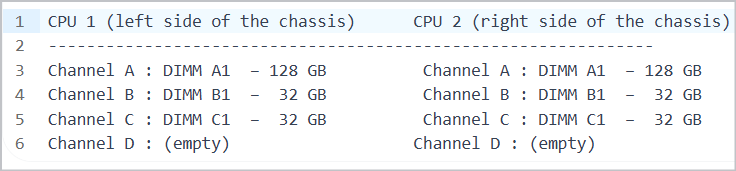
Regards,
DELL-Bridjet V
Social Media and Communities Professional
Dell Technologies | Enterprise Support Services
#IWork4Dell
Was your query answered? Please click Thumbs Up on the post that helped to Mark it as Accepted Answer!
-

DELL-Erman O
Moderator
•
2984 Posts
•
14874 Points
0
0
Posted May 23rd, 2025 08:53
Hi,
Yep, you can mix different RAM sizes in the PowerEdge R450 it’s totally doable. The key thing is that all the RAM sticks need to be the same type: Registered DIMMs (RDIMMs). You can’t mix those with other types like LRDIMMs or UDIMMs but do not mix RDIMMs with other types like LRDIMMs or UDIMMs.
.
Also, while it’s okay to mix sizes, it’s best if all the RAM runs at the same speed. If they don’t, the system will just run everything at the speed of the slowest stick.
Now, looking at your current setup it works, but it’s not ideal. The memory isn’t balanced across the channels, which means you might not get the best performance. The system will still use all the RAM, but it won’t be as fast as it could be with a more balanced layout.
To get things running more smoothly, try rearranging the modules like this:
This way, each memory channel ends up with 96GB, and the modules are paired more evenly which should help with performance.
please follow up this guide.
Hope that helps!
DELL-Erman O
Social Media and Communities Professional
Dell Technologies | Enterprise Support Services
#IWork4Dell
Did I answer your query? Please click on ‘Mark as Accepted Answer’. ‘Thumbs up’ the posts you like!