
Solved!
Go to SolutionK
KirbyManiac
1 Rookie
•
18 Posts
0
12697
July 1st, 2019 16:00
Dell G7: Gaming performace drops when unplugged
A couple months ago i got my Dell G7 gaming laptop and while everything about it so far is solid, i am having one constant issue. When playing games plugged in i am getting the performance i was expecting, When it is not plugged in i am getting much lower fps.
11001
1
Posted July 1st, 2019 17:00
Same on my G7. My guess is that it has to do with the battery, that it can't supply the power needed for higher FPS and better performance. I've tried playing around with the battery power settings but to no avail. Once I plug it in the performance improves considerably.
10989
0
Posted July 1st, 2019 20:00
Welcome to the Dell Community @Facep1ant and @KirbyManiac
Disabling "SpeedStep" in the BIOS can improve performance but reduces battery run time.
There will always be some give and take you just need to find what works for you.
Best regards,
U2
10977
0
Posted July 2nd, 2019 00:00
Sorry to make this harder than it has to be but i am not sure on how to disable it.
10963
0
Posted July 2nd, 2019 04:00
KirbyManiac,
To disable the SpeedStep option in the bios, follow the steps below.
Start the computer and Tap the F2 key to enter the bios.
Navigate to the Performance Tab
Down to Intel SpeedStep and uncheck the box.
Save changes and exit the bios.
Jesse L (retired)
11073
0
Posted July 2nd, 2019 15:00
Having this disabled most of the time gonna affect my battery, as in it's overall life?
11067
0
Posted July 2nd, 2019 16:00
Run time on battery will be shorter.
Overall battery life I am not sure about???
Regards,
U2
11045
2
Posted July 3rd, 2019 01:00
I thought i would have worked, but it changed nothing.11042
0
Posted July 3rd, 2019 03:00
Would having it plugged in most of the time while gaming as my laptop is mostly stationary damage the battery or laptop, if not then that is my solution.
2096
0
Posted July 3rd, 2019 05:00
Your laptop comes with a "SMART" power system.
The center pin of your AC adapter is used to communicate with the laptop to prevent over voltage/current.
It also regulates the charge/discharge of the battery to prevent over charging and accelerated deterioration of the battery due to being fully charged all the time.
Regards,
U2

U2CAMEB4ME
6 Operator
•
6245 Posts
11094
0
Posted July 2nd, 2019 04:00
@KirbyManiac and @Facep1ant
Power-on and start tapping f2.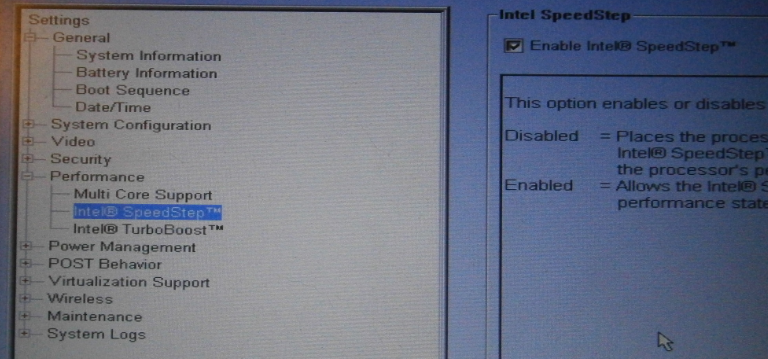
Click on the "Performance" tab.
Make sure "Enable Intel SpeedStep" is unchecked.
Save and exit.
Regards,
U2