
Solved!
Go to SolutionXPS 9530 (2023) Nvidia Graphic Card not found after update bios to v1.9.0
Hello Everyone, i'm currently experiencing a problem with my XPS 15 9530 (2023 model) for the Nvidia graphic Card. The dedicated Nvidia graphic card is no longer available after update to bios version v1.9.0.
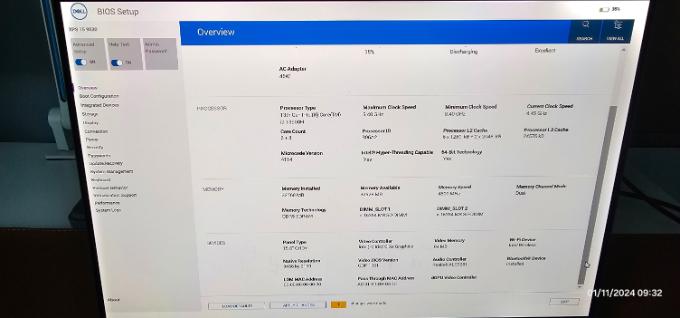
I've tried in safe mode, reset CMOS settings, rollback bios versions, all the solutions doesnt work. The nvdia card is just disappeared from system, it not available in "Windows Device Manager", when i tried to reinstall the nvdia driver, its juste impossible because "no nvidia graphics card detected in system". And i feel wired that the "dGPU video controller" in bios is empty, maybe the motherboard is broken ?
Knowing that i've only bought it for 3 months, i'm désappointed for a notebook at that price . Does anyone have same issue like me ? Any suggestion is welcome, thanks a lot !


0
0
Posted January 12th, 2024 04:45
Click on Get Help Now, bottom right of your screen, for a live chat and be connected to Dell Technical Support agent.
0
0
Posted January 17th, 2024 22:18
Had this exact same problem and spent an afternoon with Dell support achieving nothing...
Then discovered that when I use the 130W dell power supply the NVIDIA GPU comes back!
Appears in the BIOS under "dGPU Video Controller", and also in windows device manager
(Requires a restart, possibly full power cycle)
Note I was previously using the 90W USB C supply from a Dell monitor
And turns out that after using the 130W supply just once, I can now go back to the 90W USB C supply and the NVIDIA controller is still there even after full power cycle
(Now working fine again just like before the BIOS upgrade)
I suspect that this BIOS upgrade reset some GPU settings, and without the 130W supply the GPU was never re-enabled and so never even detected by the BIOS.
With the full 130W the GPU was automatically enabled and then detected by the BIOS which could change some settings to keep it enabled once it knew it was there.
Thats my theory anyway
5
1
Posted January 18th, 2024 20:52
Turns out this solution didn't last :(
The next day my NVIDIA GPU has disappeared again, and I still haven't been able to get it back this time!
0
0
Posted January 24th, 2024 14:15
Just been troubleshooting problems with XPS15 9530 after the same BIOS Update. System was receiving blue screens referring to graphics card driver problems.
I uninstalled the Nvidia 4070 drivers in device manager before attempting to reinstall. After the uninstall the system no longer would detect the Display adaptor and Nvidia installer claimed no compatible hardware to install.
Went to Dell command update and noted yet another new BIOS update 1.10.0 released 19/01/2024https://www.dell.com/support/home/en-uk/drivers/DriversDetails?driverId=995Y1
After installation of this BIOS update the graphics card showed up in device manager again and drivers installed without issue. I am hoping that the source of Blue screens on the system where triggered by the system attempting to use the card when it was "not there". Time will tell if the blue screen problems are resolved.
I suspect you have the same issue and the BIOS update will hopefully fix your problem.
Oh I have got to mention that someone in Dell really messed up when they duplicated the system model name there is an XPS 15 9530 (end of life) out there which could cause major confusion when looking for drivers or troubleshooting the system.
4
0
Posted February 4th, 2024 09:08
I just found that there is a new BIOS - 1.10. I hope this will solve the problem. I just noticed that my graphics card is also not being recognized by the system (recently the display is struggling when i do 3D modelling).
3
1
Posted February 8th, 2024 07:04
I started to have the same problem around the time my dell xps 9530 updated to the 1.9.0 bios. I tried the 1.10 bios, rollback to 1.7.0, 1.8.0, 1.9.0 and 1.10 again, no luck. My gpu does not work. It is not detected in the bios menu (dgpu empty) nor in windows in the device manager.
I Hope a new bios will fix the situation. I have a 2500€ brick on my hand.
2
0
Posted February 27th, 2024 08:30
Forum Users,
Please update the Nvidia graphics & BIOS to the latest, to see if the issue is resolved or not. Let us know the results.Jesse L (retired)
0
May 15th, 2024 12:23
@Jesse L (retired)
This did no work for me. See my issue here: https://www.dell.com/community/en/conversations/xps/blue-screen-missing-gpu/664263423a00f4589788e857(edited)
3
0
Posted February 27th, 2024 14:19
nope, not working with latest bios and Nvidia graphic driver at all.
BIOS sometime can detect but most of the time cannot detect. Reported to Dell technical but only told me replace motherboard. But think properly replacing motherboard really can solve the issue? BIOS cannot update at all or else Nvidia will be missing again. Anyhow, i will wait for the motherboard replaced then update the bios in front the technical. If really missing again, meaning is the BIOS issue not the hardware.
3
1
Posted February 27th, 2024 22:25
I have the same issue with my XPS 15 9530 (2023). Newest BIOS is installed (1.10). I also tried to downgrade to 1.9 but that did not help. In BIOS overview 'dGPU video controller' is just empty. Nvidia drivers and Windows device Manager act like there is no Nvidia graphics card at all. Ofc there was an rtx 4060 before..
(edited)

DELL-Nat M
Community Manager
•
3808 Posts
•
21515 Points
5
0
Posted April 2nd, 2024 15:59
Hi all,
We ask you to please contact tech support by clicking the "Get Help Now" button located at the bottom right corner of the page. Technical Support will conduct tests to determine if any replacements are necessary.
The chat button is marked with a help icon for easy recognition, as shown in the image below:

(edited)
#IWork4Dell