
UNSOLVED
U2711, bizarre problem
Hi all
I have a 12yr old Dell U2711 monitor. In the last few days, when I turn it on (while also starting my PC) the screen comes up like this in the picture once the PC is on the Windows login screen.
It’s definitely a monitor issue as the monitor menu options in the corner also has the problem (see 2nd picture).
When I turn the screen off and on, it then fixes the problem and it works normally - although sometimes I’ve had to do that a few times or unplug and plug in the power cord.
I can’t find anything about this problem online or in the manuals etc.
Is there any way to permanently fix this? Is it a problem that may get worse, making the monitor unusable eventually?
Thanks in advance for any help/advice - it’s hugely appreciated!

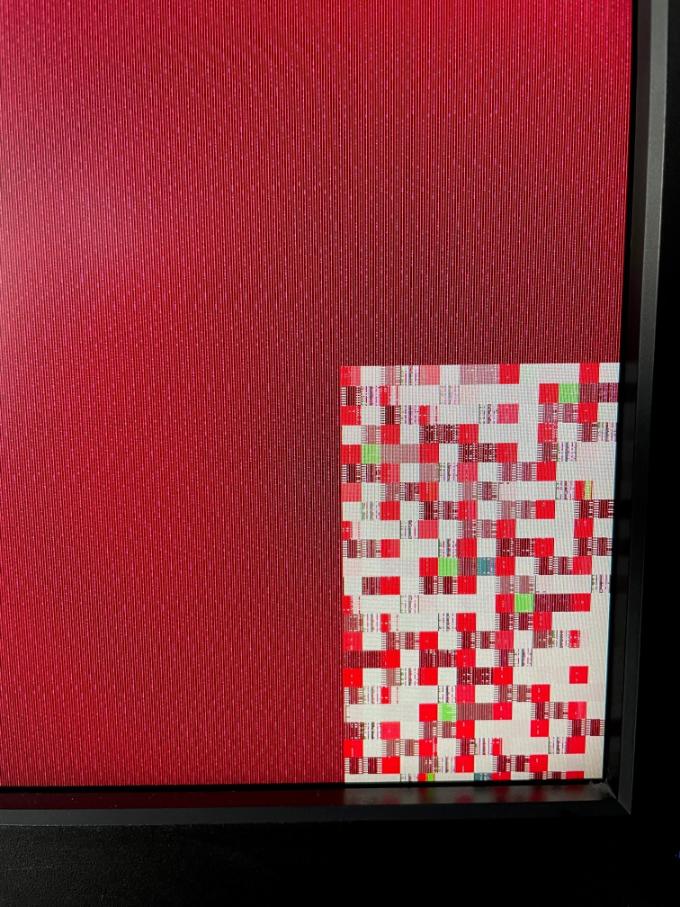
(edited)
1
0
Posted October 29th, 2023 22:21
Hi Chris - thanks for your reply. Do you mean there is no fix for the monitor, and the best thing I can do is replace it with a new one? Or do you think it's something that won't get worse and I can live with turning it on/off a few times?
2
0
Posted October 30th, 2023 11:38
Do you mean there is no fix for the monitor?
* It appears that some internal component is failing. So yes, no fix unless you can find parts and disassemble and replace them.I can live with turning it on/off a few times?
* That is a possible workaround.
DELL-Chris M (old account)
#IWork4Dell
1
1
Posted November 10th, 2023 20:29
So funny? coincidence, but my U2711 starting doing pretty much the exact same thing for the last few weeks when I wake my computer up first thing in the morning. So far powering cycling the monitor with the front button brings it back, but I suspect it will get worse. I think room temperature is playing a factor since its getting into the cold weather, and I generally don't run the heating over-night, so the monitor is relatively cold when this happens.
(edited)
1
1
Posted November 25th, 2024 14:18
I have also been experiencing this same issue for roughly 6 months now. Power cycling the monitor has resolved the issue each time, but it is a nuisance. If anyone sorts out what component is going bad that is the culprit, I would be very interested as I don't really want to spend the money to replace the whole screen when it works just fine otherwise.
1
1
Posted November 27th, 2024 21:58
I have the exact same problem with my u2711. Has anyone been able to fix it? Could even be loose solder connections inside.
1
1
Posted February 3rd, 2025 13:07
I have this issue - i've been turning off an on daily for nearly two years now!
Whatever is failing is doing a great job of hanging in there.
1
0
Posted August 24th, 2026 09:06
@guho2003 <-- The only thing that revived mine for a while was substantial disassembly - starting with prising the front bezel off first - after separating from the stand - and disconnecting the ribbon cables and applying a good shot of DeoxIt to each of the connectors.
Sadly, that didn't help for long, so, as with most of the posters here, I've adopted a routine of firing up the computer(s) (KVI box) it's attached to, and by the time I'm ready to sit down, half the screen is good.
With AMdroid alarm/timer I set a prompt for 1m30secs and turn the screen off. When the alert sounds, I turn the monitor back on, and it almost always wakes up full-screen. (Recycle if not.)
It's certainly annoying that all for a design error and a poor choice of chips, this thing would last indefinitely. Electronics can be very reliable.(edited)

DELL-Chris M
Community Manager
•
56891 Posts
•
232143 Points
1
0
Posted October 29th, 2023 14:24
Dell does not have monitor internal component parts. You will have to search online for non-Dell sellers to see if they have parts. The used eBay market value is about $60. Time to replace it.
DELL-Chris M (old account)
#IWork4Dell