
Solved!
Go to SolutionG
goodnewsforyou
2 Intern
•
126 Posts
•
159 Points
0
365
June 27th, 2026 20:48
Inspiron 5502 laptop.
 (Background: I had to replace my keyboard for the Inspiron 5502 laptop and I ordered the keyboard from them. I had to take the entire laptop apart and now I'm putting it back together again).
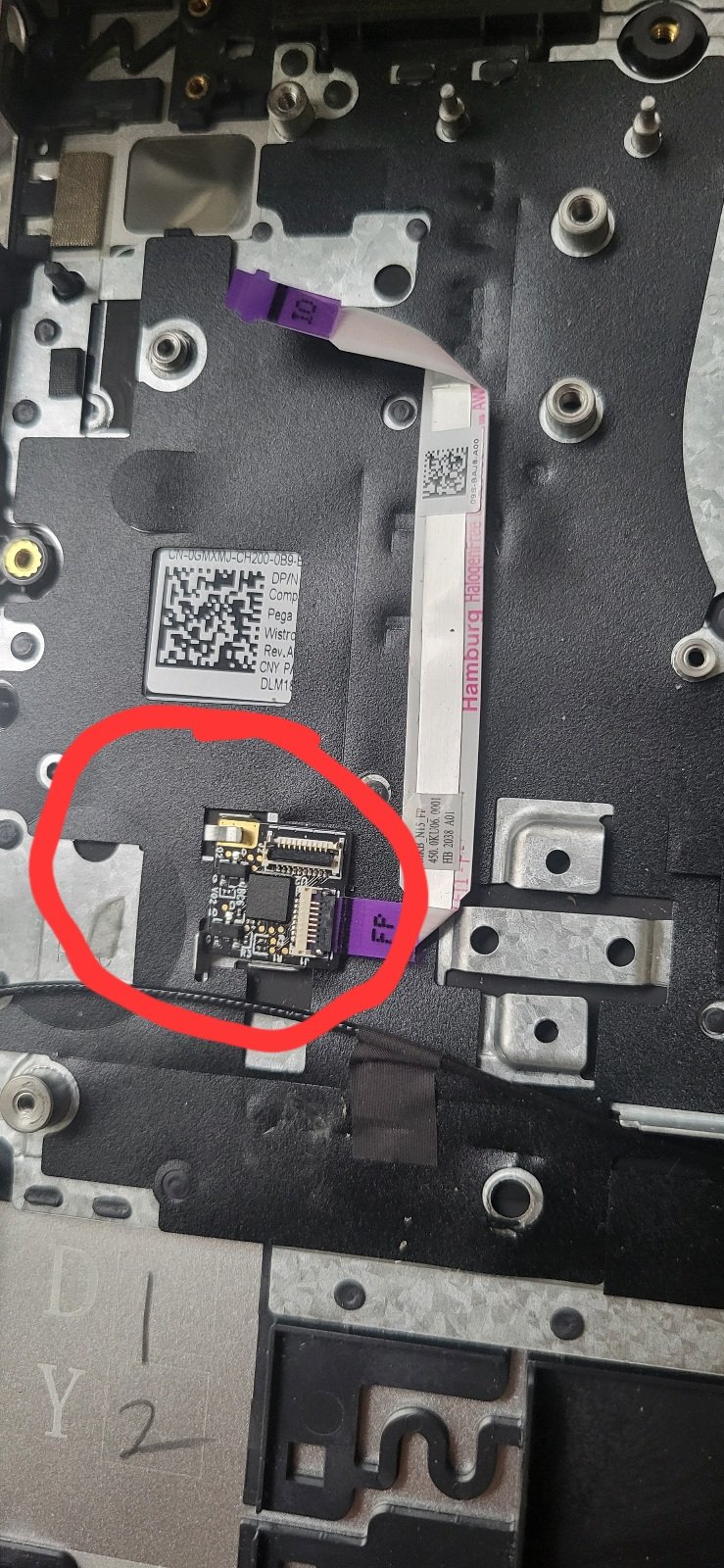
The manual gives zero instruction on how to remove this FP circuit board. I see a clasp but when I push it is hard to push the board out. I don't see any screws attached. The pictures show the old keyboard with the FP board still attached and the new keyboard without the FP attached, also shown is the manual section.
(Rant. This is really a low quality instruction manual and there are numerous 'fails' in it).

(edited)
0
0
Posted June 27th, 2026 21:20
@DELL-Daniel V The 3D guide is the worst. I used it initially and then found all sorts of problems which I told the Dell tech support over the phone. In fact he did not recommend it either.
Did you look at the step for IO board removal in the manual you recommended? It also skip the removal of the board. see the screenshot - it only asks you to remove the cable.
(edited)

1
1
Posted June 27th, 2026 22:18
Is the Dell part number on the replacement the same as on the original? From the photos and manual, it appears there are different versions of the assembly depending on whether or not the optional fingerprint sensor is included or not.
0
0
Posted June 28th, 2026 00:18
@ejn63 excellent point. I took pictures of the QR codes in the old keyboard and the new keyboard Will the part numbers be on it? They do not match.
I did a Google search and it said that I should just peel off the fingerprint reader as it is attached by adhesive to the paper below and that worked but I am still trying to attach the fingerprint cable to the reader and that is not working. I'm wondering if they sent me the wrong part number by mistake. But what would I do if it is the wrong part number.

(edited)
0
0
Posted June 28th, 2026 00:40
@ejn63 I'm trying to attach the purple FP cable into the fingerprint reader (which I peeled off from the old board as mentioned in the post above). However the black line on the purple FP cable seems really deep and the latch on the reader is really shallow. Can you please tell me if that silver metallic line in front of the latch is another gate that I must lift up? You can see I have lifted up the black latch but again it is very shallow and does not hold the purple cable.

0
0
Posted June 28th, 2026 09:50
Hi
"Peeled off" surprises me, as ...
On the Dell Inspiron 5502, the fingerprint reader is part of the power button assembly, so you replace the whole power-button-with-optional-fingerprint-reader unit rather than just the sensor by itself. Dell’s service manual says to remove the old part, align the new power-button assembly with the palm-rest/keyboard assembly, reconnect the cable, and then reinstall the bracket and screws.
Kind Regards
anne_droid

0
0
Posted June 28th, 2026 13:09
@goodnewsforyou correction. I meant to say "circuit board for fingerprint reader".
0
1
Posted June 28th, 2026 13:09
@anne_droid Thank you for pointing this out. I updated my post with 'correction. I meant to say "circuit board for fingerprint reader". '

goodnewsforyou
2 Intern
•
126 Posts
•
159 Points
1
1
Posted June 29th, 2026 02:13
Update: It is really hard to see but one has to slide in the FP cable between the brass teeth and the white base. I was finally able to do this by using the magnifier on the cell phone and a pair of tweezers to hold the purple plastic tab. Then I was able to get it into the fingerprint reader board