
UNSOLVED
F
franckehret
1 Rookie
•
19 Posts
0
529
February 15th, 2024 13:21
Can't migrate from v3 to v4 because of certificate chain
Hi there,
I can't initiate the migration process because there is a certificate chain issue when I want to start the process and self signed is grayed out:
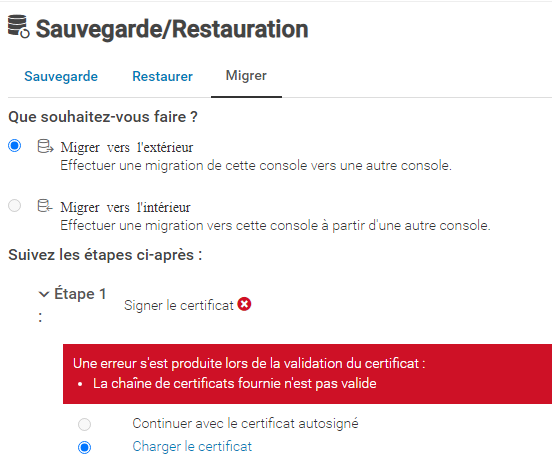
My current certificate was signed by my Microsoft CA as mentioned in this documentation: https://www.dell.com/support/kbdoc/en-us/000184683/how-to-manage-custom-certificates-in-openmanage-enterprise
I've tried to regenerate one and upload the certificate chain but I get the following error:
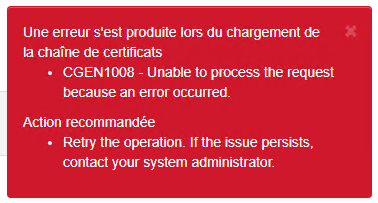
So I'm confused about my possibilities. I have no problem to ditch the current certificate and reuse a self signed one temporarily but I didn't find how to regenerate one.
Can anybody help me? Thanks in advance.
Kind regards
Franck
0
0
Posted February 15th, 2024 19:44
Hello,
Did you get to view the video from the page you linked
OpenManage Enterprise Custom Certificates
This video guide to migrate may help for the process:
How to Migrate OpenManage Enterprise From 3.10.x to 4.0
If you please let me know what time mark you start having the issue it may help identify the issue.
Take a look at Article Number: 000219280 OpenManage Enterprise 3.10.x to 4.0 Migration
Link below. It mentions the (CGEN1008) error you see:
The installed certificate must be signed by the same Certificate Authority on both the source and destination consoles. The uploaded certificate must have both client and server authentication, and key encipherment enabled for Public Key Usage (Key Usage Extensions). Otherwise, it is considered a nonvalid certificate chain and an upload error is thrown (CGEN1008).
Generate and download a certificate signing request
Page 63
If you contact Support directly and ask for the Systems Management team an engineer could do a remote session with you to get a look .
DELL-Charles R
Social Media and Communities Professional
Dell Technologies | Enterprise Support Services
#IWork4Dell
Did I answer your query? Please click on ‘Accept as Solution’. ‘Thumbs up’ the posts you like!0
0
Posted February 23rd, 2024 09:57
Did you get to view the video from the page you linked
OpenManage Enterprise Custom Certificates
I did exactly what is mentionned in this video step by step
This video guide to migrate may help for the process:
How to Migrate OpenManage Enterprise From 3.10.x to 4.0
If you please let me know what time mark you start having the issue it may help identify the issue.
As soon as I click "migrate out", I can't select the "Proceed with self signed certificate", it's greyed out, despite I did regenerate a new certificate from scratch from my Microsoft ADCS.
As stated in my first post, uploading the certificate chain doesn't work either so I just can't even start the migration process as source doesn't allow me to get past the very first step.
Any clue how to reset the certificate to real self signed?
0
0
Posted February 23rd, 2024 13:13
Hello,
if those steps doesn't work as suggested by Charles i invite you to contact directly the support and check with them how to fix the issue.
Thanks
DELL- Marco B
Social Media and Communities Professional
Dell Technologies | Enterprise Support Services
#IWork4Dell
Did I answer your query? Please click on ‘Mark as Accepted Answer’. ‘Thumbs up’ the posts you like!0
2
Posted March 1st, 2024 14:27
@franckehret Hi!
You just have to add the intermediate and root details to your own server certificate file manually.
Full chain certificate looks like this:
-----BEGIN CERTIFICATE-----
(certificate details)
-----END CERTIFICATE-----
-----BEGIN CERTIFICATE-----
(intermediate details)
-----END CERTIFICATE-----
-----BEGIN CERTIFICATE-----
(root details)
-----END CERTIFICATE-----I've just tried, and works.
Good luck!
0
0
Posted April 4th, 2024 13:40
We faced the same issues and called in to Dell support. I was told the only way to get a self-signed certificate back is to backup the appliance and re-deploy from the OVF. Once a signed cert was installed there was no going back to self signed. Hope that helps
0
0
Posted August 7th, 2024 11:30
Thanks for the hint, I was trying to upload a .pem file created with command
openssl pkcs7 -inform der -print_certs -in mycert.p7b -outform pem -out mycert.pemwhich adds headers and puts the chain in wrong order.
Also, it took a reboot of the appliance before I could finally complete the migration process.
0
0
Posted November 22nd, 2024 07:20
Hi there,
For myself, I did try all possible certificate chains, that was explained in my 2nd post.
I finally did reinstall it from scratch in my homelab.
Luckily at work, we used Digicert certificates and migration worked well.
If Dell could fix something that simple for the next version... that would be nice! 😉

franckehret
1 Rookie
•
19 Posts
0
0
Posted February 15th, 2024 13:40
PS: what I tried:
- upload p7b chain (from my CA) before the certificate (with new CSR)
- upload p7b chain after uploading the certificate (with new CSR)
- create a b64 chain with leaf certificate & root certificate (in that order)
- create a b64 chain with root certificate and leaf certificate (in that order)
None worked and gave the same error