
Solved!
Go to SolutionG
Gustavo599
1 Rookie
•
4 Posts
16
20674
October 19th, 2023 12:56
XPS 13 Plus 9320, Intel driver broke camera
Last windows driver update broke the camera - Intel - Extension - 1.0.0.273 / Intel - Extension 3.1.0.7611
We have so far 5 impacted assets
Any help Dell?

(edited)
0
5
Posted October 20th, 2023 11:50
I had a brand new XPS PLUS 13 delivered on 18th October. The webcam was working fine as I could setup Windows Hello. As soon as the machine did a windows update the webcam stopped working and driver errors showed up on the device manager. I reset my PC to factory defaults using Dell Bios software and it worked again! Then as soon as the windows updated itself again the camera stopped working again!
The issue is that there is a windows update called Intel - Camera - 63.22000.3.10290 (2)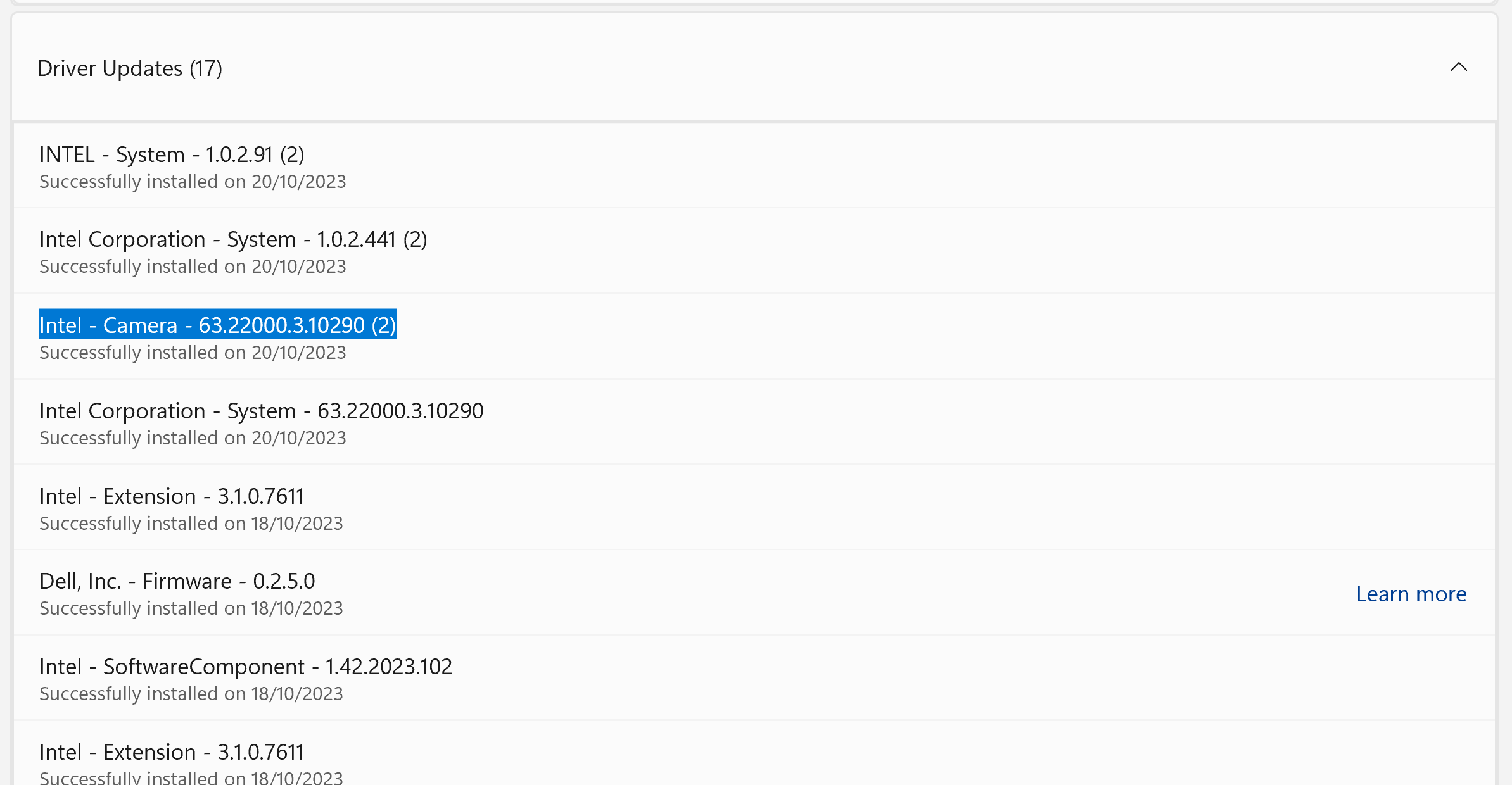
However the latest driver version on the Dell website is 73.22000.1.8_A00_02
Dell support tried to manually install the new driver but it keeps on defaulting to the older version (which is the newer windows update). This also causes some other drivers to stop working: See Screenshot The issue is with the windows update. I was assured by Dell that they are on the case with Intel and Microsoft to sort out, looking at a resolution by Monday/Tuesday. This will require a new windows update to be served.Please note - this is not faulty hardware but a software issue!
(edited)
0
6
Posted October 20th, 2023 17:59
***** SOLUTION ******
Greetings from Dell Technical Support.
Kindly try the steps below
Uninstall USB Bridge Extension v3.1.0.7611 driver follow below steps:
1) Open Device Manager and find below picture shows device and click “View” and select “Drivers by device”:
2) Double click the oemxxx.inf to find out which one is v3.1.0.7611 version as below picture shows:
3) Click “Remove driver” then select both the options and click “Remove”: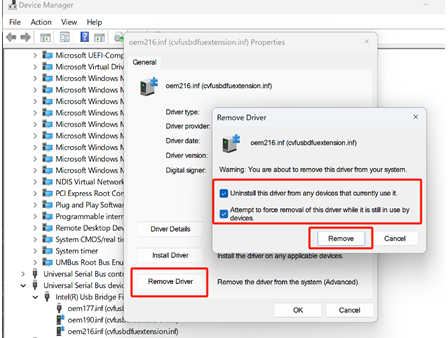
4) Wait for a minute the driver will be removed and restart your system and check if the webcam works.
CORTESY OF DELL SUPPORT
My webcam now works!!!1
2
Posted October 19th, 2023 13:33
Also have XPS PLUS 9320 and my camera has stopped working today - had a few blue screens, reset the laptop, now have a Power Failure message for the camera...
1
0
Posted October 19th, 2023 17:20
I'm experiencing this too. Extremely inconvenient as video calls are my entire job. Looks like there's a Reddit thread about this as well. https://www.reddit.com/r/Dell/comments/17al8oo/did_the_latest_update_break_the_camera_for_any/?sort=new
1
1
Posted October 19th, 2023 18:32
I am having the same issue.
1
1
Posted October 19th, 2023 18:39
just spent 40min on remote support with Dell, they tried everything from updating BIOS, drivers, troubleshooting etc. nothing helped. They will be sending out a technician to replace the whole LCD panel. Seems like the new update is bricking the webcam. Not exactly the solution I was hoping for. Considering i need the cam every day i have no option just to replace it.
0
3
Posted October 19th, 2023 18:42
The update completely bricked the camera for me, zero physical damage so i refused the option suggested that they replace the camera, customer service clearly had no idea what was going on.
We need a patch fix asap as eventually every single XPS Plus is going to have this situation shortly.
1
1
Posted October 19th, 2023 18:52
I am having the same issues here!
1
2
Posted October 19th, 2023 19:35
I'm in the same boat. And I'm having a hard time believing a bad driver is leading people to have screens replaced. That's absolutley nuts.

DELL-Nat M
Community Manager
•
3805 Posts
•
21481 Points
1
0
Posted January 26th, 2024 15:36
Hi all! Exciting news, the new driver dated January 20, 2025 is now available - Intel 2D Imaging/MCU/Visual Sensing Controller Driver for Camera RESTART REQUIRED!
To optimize compatibility, exclusively download additional drivers from the Dell website.
We invite you to test this new version and share your valuable experience with us.
Thank you for your patience.
If still having webcam issue, click the blue "Get Help Now" on the right to start a private live chat session. Share the private XPS 13 Plus 9320 Service Tag with them. State that you are using the January 20, 2025 73.22000.1.26 A06 webcam driver.
(edited)
#IWork4Dell