
Solved!
Go to SolutionUnable to register datastore
Hi
I am trying to register another journal datastore in RecoverPoint for VMs. Currently we have 2 Journal datastores registered. I go to System > Datastores then click Add and I'm presented with the Register Datastore window. However, it says there are 0 Datastores available at the the vRPA cluster but i know there are several datastores available.
The reason I want to register another datastores is that we have an alert that says the vRPA cluster detected the datastore was removed and may need to re-register the datastore. Now, the 2 existing datastores have never been removed, so not sure why that has appeared.
As there is no re-register option, I thought I would add a new one, then remove the old one.
So, how do i make a datastore available to the vRPA, so that it can be registered?
Thanks
Roy
0
0
Posted May 19th, 2025 17:16
Hello Roysm,
Which version of RP4VM are you using as you didn’t state it in your post? Here is the link to a kb that maybe of assistance. https://www.dell.com/support/kbdoc/en-us/000201973?lang=en
0
0
Posted May 20th, 2025 07:19
@DELL-Sam L Hi. We are running RecoverPoint 6.0.SP1.P2. We are on VCenter 8.0.3 with the hosts running the RP VMs on 8.0.2 at the moment.
Also the the link you provided does not work for me. All I get is Page not Found
0
0
Posted May 20th, 2025 16:19
RecoverPoint for VMs: Unable to Register Journals as Datastores within the RP4VMs UI Audience Level: Customer
Summary: RecoverPoint for Virtual Machines contains a feature where specific datastores are registered to be used as journal datastores. When registering only these specific datastores, users can ensure that their journals are created and stored in an organized fashion. In some instances, the ability to register a datastore to be used as a journal is not available, as the list is blank and unpopulated.
Symptoms
The main symptom occurs when attempting to register a datastore to be used as a RecoverPoint for VMs journal and a blank journal addition screen appear: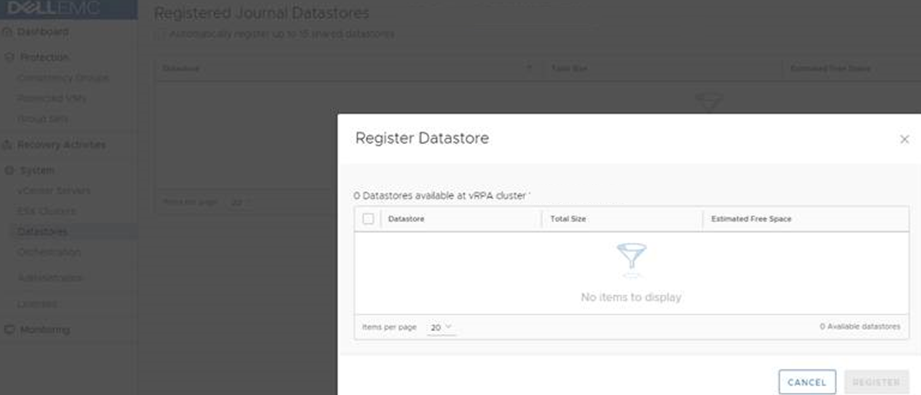
Cause
In order for a datastore to be eligible for registration as a journal datastore, it must be visible and accessible by all ESXi hosts in the ESXi cluster that is hosting the vRPAs. If an ESXi host is inaccessible, unresponsive or in maintenance mode at the time of the registration attempt, RP4VMs may poll this host and its access to datastores. If it does not receive a response, it cannot confirm that the ESXi host has access to the datastores, and filters out all datastores. This occurs for all datastores, causing RP4VMs to display no potential datastores in the Add Registered Journal Datastores wizard.Resolution
Workaround:
Ensure that all ESXi hosts are healthy, active, and accessible.
Once confirmed that all ESXi hosts are responsive and healthy, reboot the Site Control vRPA.

Roysm
1 Rookie
•
4 Posts
•
2 Points
0
0
Posted June 9th, 2025 10:22
I found the solution at https://www.dell.com/support/kbdoc/en-uk/000191003/recoverpoint-for-vms-cluster-xxxx-detected-that-datastore-xxxx-on-vcenter-server-xxxx-was-removed
Using workaround 2 sorted it, so I can now see the volumes again