
UNSOLVED
I
icjefferys
8 Posts
0
23516
August 23rd, 2006 23:00
Pictures of 2407FPW Aspect Problem (56k warning)
I've gotten requests (one and counting, I believe) for a demonstration of how the A02 2407FPW handles various analog video signals, so here goes...
My previous thread detailing the matter can be found here.
Here is the menu with the three screen size options:
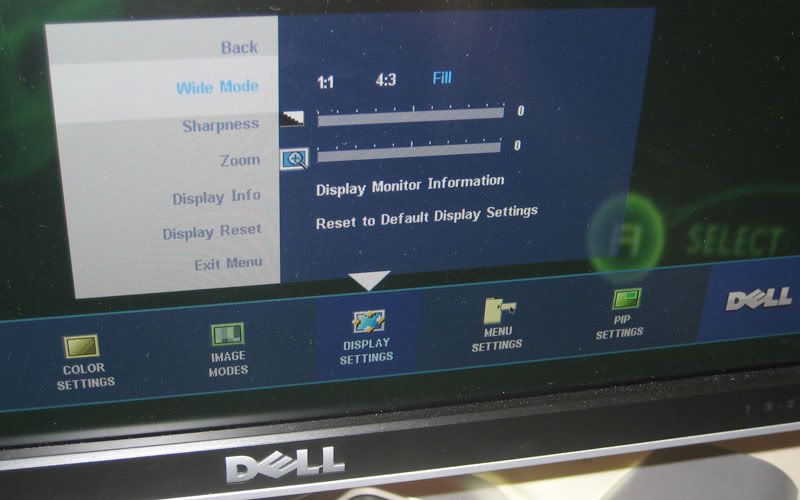
The "1:1" view option displays a small pixel-for-pixel representation of all signals in the middle of the screen. I have not taken pictures of this mode since you would never actually want to watch anything in it. For 480i/p video it is both small and the wrong (3:2) aspect.
480p normal in FILL...

480p normal in 4:3...

The way 480i/p normal should look...

480p widescreen in 4:3...

480p widescreen in FILL...

The way 480i/p widescreen should look...

720p in FILL...

720p properly displayed in 4:3...

720p is correctly displayed in 4:3 mode and I look forward to using an Xbox360 with this monitor if I don't return it first. I currently run my Xbox through this monitor with the Xbox set to widescreen mode and the monitor set to fill. For me, streching 16x9 video to 16x10 is annoying but bareable.
What kills this monitor for me though is what I've heard about how this monitor handles 1080p video. I have no external device that will output at 1080p, so for some pictures I'll have to get my computer to output such a signal.
My previous thread detailing the matter can be found here.
Here is the menu with the three screen size options:
The "1:1" view option displays a small pixel-for-pixel representation of all signals in the middle of the screen. I have not taken pictures of this mode since you would never actually want to watch anything in it. For 480i/p video it is both small and the wrong (3:2) aspect.
480p normal in FILL...
480p normal in 4:3...
The way 480i/p normal should look...
480p widescreen in 4:3...
480p widescreen in FILL...
The way 480i/p widescreen should look...
720p in FILL...
720p properly displayed in 4:3...
720p is correctly displayed in 4:3 mode and I look forward to using an Xbox360 with this monitor if I don't return it first. I currently run my Xbox through this monitor with the Xbox set to widescreen mode and the monitor set to fill. For me, streching 16x9 video to 16x10 is annoying but bareable.
What kills this monitor for me though is what I've heard about how this monitor handles 1080p video. I have no external device that will output at 1080p, so for some pictures I'll have to get my computer to output such a signal.
Message Edited by icjefferys on 08-23-200607:48 PM
Message Edited by icjefferys on 08-24-200610:48 PM
432
0
Posted September 11th, 2006 19:00
Here is a video if you would like to see how the 2407FPW distorts certain colors.Does anyone have a *technical* explaination for this? The pulsing of the video has to do with the monitor refresh rate and the scan rate of the digital camera, sorry about that. Just ignore it and look close between the bars of the image as it moves around. You can defintely see it turn pink on the 2407FPW.You can reproduce the problem by sliding around the window containing this post. The image used in the video is the same one referenced below.Cheers,--Erichttp://eric.shufro.com/2407-fail3.mpg (18 MB - but very clear!)http://eric.shufro.com/2407-fail.wmv (6.6 MB!)Message Edited by ericshufro on 09-11-200603:56 PM
Message Edited by ericshufro on 09-11-200604:06 PM
432
0
Posted September 11th, 2006 19:00
Move this image around on your screen by either scrolling this thread up and down or grabbing the window frame and sliding it around.If you have a 2407FPW, the fringes of the light grey/purple lines will turn pink when in motion.I am not sure of the exact cause but it feels like the pixels are simply changing too slowly and that something is out of whack. I have tried it on 5 2407FPW monitors and various PC's.Do you have the same result? (See the PIC below)--Eric432
0
Posted September 11th, 2006 22:00
Just got my A03 replacement today (refurb unit though...) After playing around with the settings in the service menu, I got rid of the pink/green tracers when I scroll. Also vertical banding is almost all gone!
My settings:
http://img297.imageshack.us/my.php?image=settingsfr7.jpg
I lowered the RGB values for "PC Normal Preset" 5 degrees at a time.
R 215 G 230 B 235 seems to work the best.
Also, since I have it hooked up to my MacBook, setting the gamma to 2.2 seems to help hide the vertical banding (I used the gradient background in FrontRow to test).432
0
Posted September 27th, 2006 22:00
I have this exact problem with the pink pixelation. What is the deal? I tried changing the RBG/Gamma and all the suggested items from this thread:http://forums.us.dell.com/supportforums/board/message?board.id=dim_monitor&message.id=65065&query.id=5148#M65065
I honestly think that dell simply mass produced a defective and poorly designed monitor. I ordered a new one from their outsourced tech support over 3 weeks ago and i have not received it yet. I called them today and they have no record of me calling. Great CSRs you got there, but thats for another thread.

Xamayon
15 Posts
432
0
Posted August 25th, 2006 02:00
by the way, you might want to put up a 56k warning or some such :P