
UNSOLVED
S
srikanthvamaraj
11 Posts
0
4350
August 7th, 2016 11:00
how to transfer file using smb to windows server?
how can i transfer a schedule report to windows 2008/2012 server using remote transfer option.
what is the correct syntax for smb? are there any other option apart from this?
srikanthvamaraj
11 Posts
3477
0
Posted August 8th, 2016 22:00
i followed the syntax as above.
smb://domain/user:password@servername:445/E$/srm
i get the below error
servername:445/E$/srm/VMAX3 Udpolnam_2016-08-08_22h39.csv (smb) : org.apache.commons.vfs.FileSystemException: Could not determine if file "smb://domain/user:password@servername:445/E$/srm/VMAX3 Udpolnam_2016-08-08_22h39.csv" is writeable.
i replaced the actual server name with 'servername'. in password replaced @ with %40.
srikanthvamaraj
11 Posts
3477
0
Posted August 11th, 2016 03:00
yes i tried changing forward slash to back slash. still the issue persists.
is there any other way that i can schedule the report to windows server or NettApp share?
Hi srikanthvamaraju,,
SRM doesn't look at what hardware the share is hosted on; could be a permissions issue on the share. You can always test the connection string with a utility like smbclient (not currently available on the SRM vApp).
You may want to open a service request with EMC support (https://support.emc.com) in order to troubleshoot the issue in depth.
regards.
Isaka

fredde1
120 Posts
3477
0
Posted August 8th, 2016 10:00
Hey srikanthvamaraju:
the syntax is per the screenshot: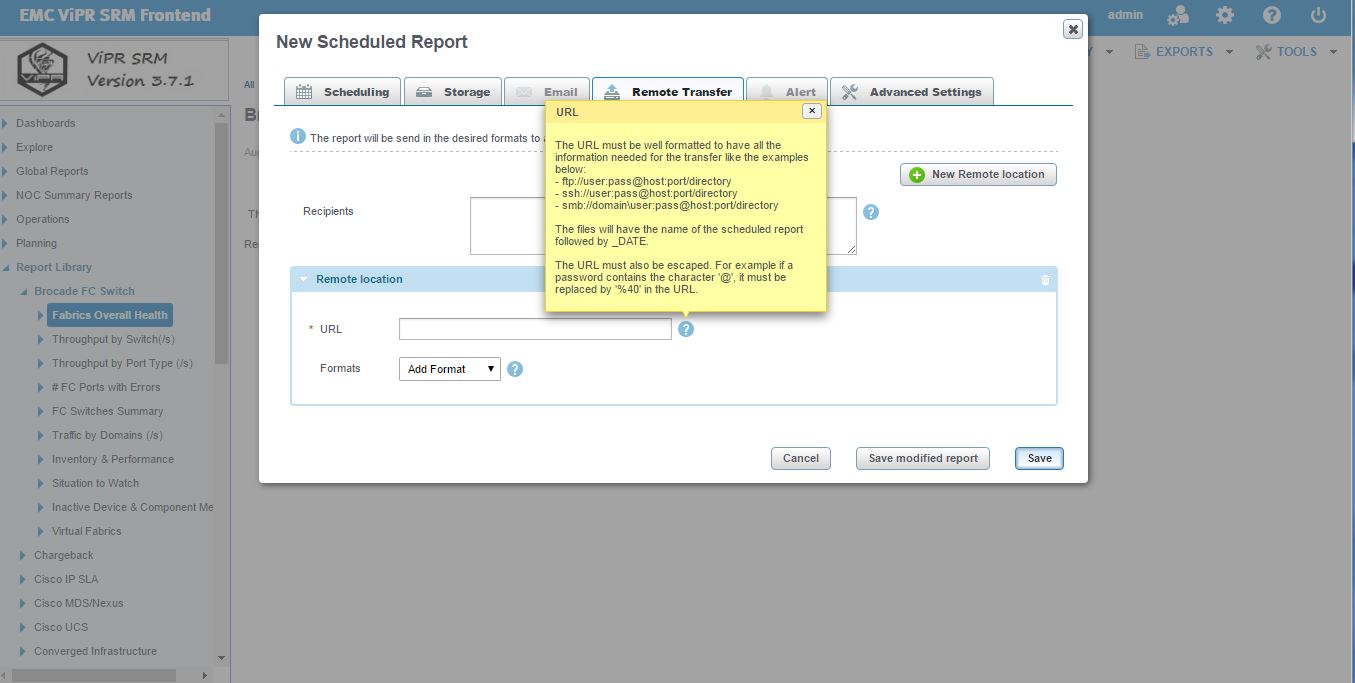
The URL would have to be escaped for a password( see screenshot above).
If you did it that way, did you get a specific error?
Thanks
Tim