
UNSOLVED
P
Philip_Yip
11 Legend
•
16052 Posts
•
65915 Points
5
984442
July 28th, 2015 18:00
How to Upgrade to Windows 10 - Information on Obtaining a Clean Install
Video Tutorial Playlist
I have made a number of Video Tutorials focusing on Clean Installing Windows 10:
https://www.youtube.com/playlist?list=PL1RkaknDn7v-Ucth4gt0U3BHVSY7oNkWr
The Download a Windows 10 RS1 .iso and Create a Bootable USB and Clean Install Windows 10 RS1 with a Windows 7/8.1 OEM Product Key (UEFI) BIOS are the most important two.
Before the Free Upgrade
Its recommended to carry out a few steps before performing an OS Upgrade. These mainly relate to a data backup and also the creation of OS Recovery Media. You will need an external Hard Drive for this and a few 16 GB USB Flash Drives:


The first thing you should do is copy anything important from Desktop, Documents, Downloads, Pictures and Videos that you cannot afford to use onto the external hard drive. You should do this regularly.
Next you will want to create Factory OS Installation Media using the latest version of Dell Backup and Recovery:
One may wish to also use Macrium Reflect to create an image of their Hard Drive which they can Restore from:
The first image is of Factory Install (how Dell shipped the system) and the second is of the current setup (all user installed updates, programs and files/folders).
Note when using a Macrium Reflect Image the Factory Restore may not work which is why I recommend carrying out both steps.
The Windows 10 RS1 Free Upgrade from Windows 8.x/10 OEM
Windows 10 RS1 is available as a Free Upgrade for all Dell Systems sold with Windows 8.x OEM and Windows 10 OEM.


The product key is embedded in the Dell UEFI BIOS and will automatically be input by Windows 10 RS1 Installation Media. The most important thing to note is the Free Windows 10 Upgrade is Edition specific. Installation Media of the Correct Edition will not ask for the Product Key as it'll automatically be picked up by installation media.
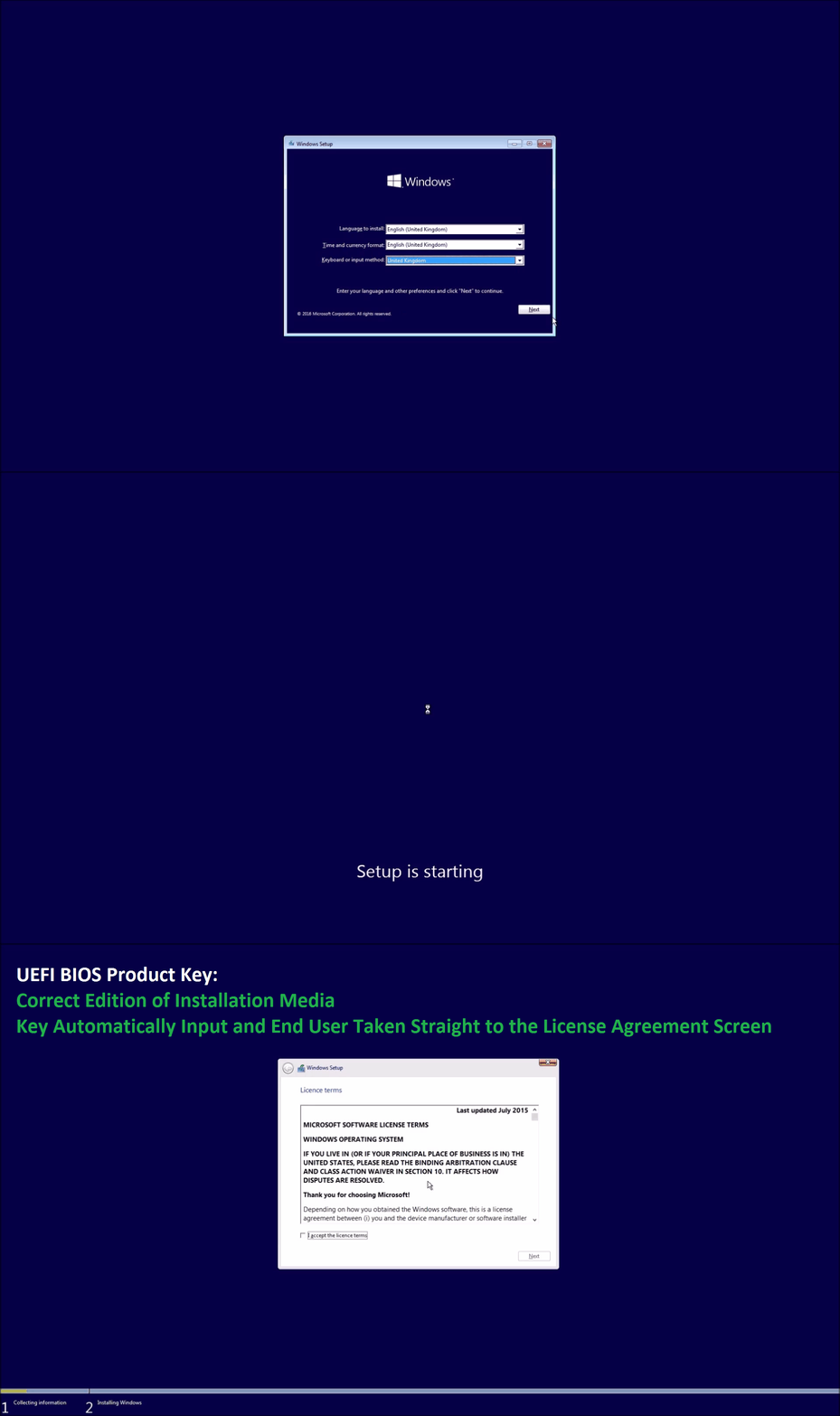
To Download and Prepare Windows 10 RS1 Installation Media see Download a Windows 10 RS1 OEM and Retail .iso.
The Windows 10 Free Upgrade from Windows 7 OEM
For a system shipped with Dell Windows 7 OEM the key is not embedded in the UEFI BIOS you'll be prompted for it during installation:
A Windows 7 COA will state the Windows 7 Edition and 25 digit product key:
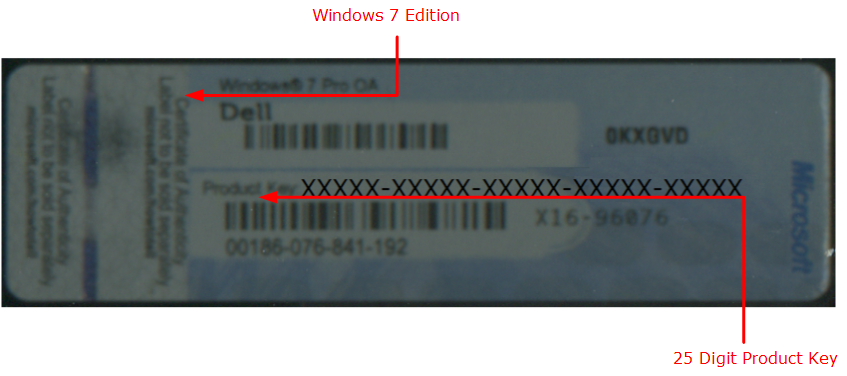
This may be found in the battery compartment of many laptops to prevent fading:

Power off the system, remove the AC Adapter and Battery. Take a picture of your Windows 7 COA with your smartphone.
Note on the first installation of Windows 7, your systems hardware profile will be compiled and stored with a Microsoft Product Activation server. This means you will only ever need to enter the Product Key once for an initial clean installation and never if you've performed an initial upgrade install. In all subsequent clean installs you may skip input of your Product Key and then select the correct Edition:
Once the hardware profile of the system has been compiled and stored on a Microsoft Product Activation server, the system is a "Windows 10 Edition Device". A Windows 10 Edition Device will automatically reactivate Windows 10 Edition when online.
To Download and Prepare Windows 10 RS1 Installation Media see Download a Windows 10 RS1 OEM and Retail .iso.
The UEFI BIOS
For optimal results the latest Dell UEFI BIOS should be installed before Windows 10 Clean Installation. Moreover one should Enable SecureBoot for optimal security. See:
Not all Windows 7 Systems have a UEFI BIOS as UEFI was implemented in 2011. You don't need UEFI and SecureBoot to install Windows 10 but if you have these features its recommended to utilise them for maximal performance and security.
Dell Driver Support vs Microsoft Driver Support
There has been much confusion here. Dell are an Original Equipment Manufacturer who make and design hardware and initial compile driver sets for their hardware. They support their hardware only for the duration of the warranty period (lifecycle of the product) however Dell Products normally survive for many years outwith their warranty period. See Dell Computers Tested for Windows 10 Upgrade.
Microsoft are a software company and want everyone running Windows 7 OEM or Windows 8.x OEM to Upgrade to Windows 10. Microsoft have decided they do not want to waste resources in supporting multiple Windows version and also want to have the biggest userbase possible for their Windows Store, Browser/Search Engine Marketshare and Online Cloud Storage OneDrive with Office 365. This gives them a continuous revenue so they can continue to support and develop their flagship products Windows and Office.
As the agenda of the two different companies is different many will be in the circumstance where Microsoft support the Upgrade but Dell doesn't. Luckily all these systems are over 4 years so the hardware is extremely well-established. As a consequence its extremely likely Microsoft have updated Windows 10 installation media to have inbuilt driver support for the components or will automatically obtain the system drivers automatically from Windows Update.
Here is a demonstration of an OptiPlex 7010 which has a clean install of Windows 10 64 Bit. I've opened the Device Manager and within 5 minutes of first connecting to the internet you see Windows 10 has downloaded all the drivers to ensure functionality. A handful of more up to date drivers may be found direct from Intel...
The latest version of Intel Management Engine Interface can be downloaded from Intel and prevents some black screen issues when coming out of sleep which are common symptoms with Windows 10 due to an older driver being obtained from Windows Update.
I have additional guides on obtaining the latest Dell Touchpad and Dell Wireless Card drivers.
The Windows 10 Free Upgrade from Windows Vista or Windows XP (Unofficial)
Neither Microsoft (or Dell) support this Free Upgrade Path.
Microsoft do not allow direct clean installs of Windows 10 using Windows XP or Windows Vista licenses. They however allowed an Upgrade Install from the Insider Preview Build 10130 to Windows 10 Pro. The Insider Build 10130 uses a Generic Product Key for installation so anyone can install and activate it.
One can hence install Windows 10130 on a system shipped with Windows Vista and then utilise that a stepping stone for their Free Windows 10 Upgrade. Once the hardware profile of the system has been compiled and stored on a Microsoft Product Activation server, the system is a Windows 10 Pro Device and will automatically reactivate when online. If you later perform a clean installation skip entry of product key and opt to install Windows 10 Pro.
For more details see:
Note however as Windows XP was released in 2001. Early Windows XP systems have ridiculously weak hardware and won't be Windows 10 capable. If you have anything older than 10 years you will struggle with this upgrade path and its time for new hardware or second hand hardware such as an ex-business OptiPlex 780.
Download Windows 7 or 8.1 Installation Media (Semi-Official)
One can Download all the Editions of Windows 8.1 OEM with Update 2 from Microsoft except for the with Bing OEM Editions. For more details see:
Windows 7 OEM can be Downloaded from Microsoft's Techbench. For more details see:
7091
0
Posted August 5th, 2015 07:00
The initial upgrade retains programs and user data. The Clean Reinstallation wipes everything and installs only Windows 10.
7091
0
Posted August 5th, 2015 08:00
It might be worth stressing this in your tutorial or there could be some people who don't find out until they've wiped all those programs!
7091
0
Posted August 5th, 2015 09:00
I thought I mentioned in the guide that the recovery drive was vanilla Windows 10 and not a system image, I will update this guide soon.
7088
0
Posted August 6th, 2015 11:00
Well you did, but given the number of problems I've seen recently where people didn't read things properly (or understand them) - for example the number of people who have done a fresh install of W10 not an upgrade, then found they couldn't activate - it wouldn't hurt to stress the point.
Especially as 'vanilla' isn't an expression that everyone would recognise outside an ice cream parlour :emotion-5:
7088
1
Posted August 6th, 2015 13:00
why you don't describe how to solve the 80070003 error which most of the people are having when trying to upgrade to windows 10 from windows 8.1?I have bought a new laptop from you couple of days ago and I cannot upgrade to windows 10 although I have tried many things trying to solve this issue but still nothing.I expect a formal solution by you.
7089
1
Posted August 11th, 2015 09:00
If you are expecting Dell to provide you with solution it's going to be a very long wait. I attempted to U/G close to 15 times. All my calls to Dell were greeted by one of 2 answers. This is not covered by your warranty (the machine is 3 months old) or its not our problem call Microsoft.
Dell should be ashamed of the level of customer service they provide. If your lucky enough to find a tech who understands English, that's half the battle. They work off scripts and really have no clue as to what they are doing.
Dell managed to lose a long time big volume customer (me) over this issue.
STOP OUTSOURCING TECH SUPPORT!!!
I doubt the moderator will allow this post but I needed to vent.
7090
0
Posted August 12th, 2015 11:00
why you don't describe how to solve the 80070003 error which most of the people are having when trying to upgrade to windows 10 from windows 8.1?I have bought a new laptop from you couple of days ago and I cannot upgrade to windows 10 although I have tried many things trying to solve this issue but still nothing.I expect a formal solution by you.
Start by telling us what you have tried so we can suggest some other ideas. I assume you have carried out the instructions here?
http://windows.microsoft.com/en-gb/windows/windows-update-error-80070003#1TC=windows-7
7090
0
Posted August 12th, 2015 15:00
Hi,
I have try the what you are mentioning and almost everything that is available on the internet about how to solve this error!!!
I have also try what you mentioned on this post http://en.community.dell.com/support-forums/software-os/f/4997/t/19646775
and still I am unable to upgrading to win 10.
So what is going to be is there a solution or not? Why you cannot take my laptop and fix the problem free of charge since I have warranty!!! I have tired talking to your technical support and none can provide a solution to the problem. I demand a formal solution by you and instead of giving instructions which are no longer valid solve the problem ASAP and don't tell to call your outsource company to solve the problem for a small charge because this is completely unacceptable.
2277
1
Posted August 12th, 2015 17:00
So what is going to be is there a solution or not? Why you cannot take my laptop and fix the problem free of charge since I have warranty!!! I have tired talking to your technical support and none can provide a solution to the problem. I demand a formal solution by you and instead of giving instructions which are no longer valid solve the problem ASAP and don't tell to call your outsource company to solve the problem for a small charge because this is completely unacceptable. Although I am a Dell Community Rockstar I am not a Dell employee. If you want a formal solution from Dell you will have to go ahead and call them.
If you want help from me you will need to work with me and explain exactly what you have tried. If you don't co-operate I won't help you any further.
For instance have you reverted to factory settings then attempted the upgrade directly? Have you tried Clean Installing Windows 8.1 and then attempting the upgrade.
Also bare in mind the Windows 10 free upgrade is valid for a period of 1 year and it will take time for both Dell and Microsoft to patch things up for a smoother transition.

Lobbers
27 Posts
7091
0
Posted August 5th, 2015 05:00
Helpful videos Philip, if a bit quick with all those menu choices. I had to keep pausing and rewinding to catch things.
What this doesn't show though is whether the upgrade to Windows 10 or the subsequent clean reinstall from a recovery drive would remove any third party programs including Dell apps, as your Windows 10 desktop screen is empty.
I would guess the initial upgrade would not remove third party programs as the W8 to 8.1 didn't. But if the Recovery Drive is created through Windows 10, does this also keep everything on the machine, or does it reinstall just W10 and anything Microsoft is providing?