
UNSOLVED
HH
Happy Harris
1 Rookie
•
10 Posts
•
2 Points
0
434
July 26th, 2024 09:58
Aurora R4, tried to upgrade PSU and GPU now it won't turn on
So I got given a new card, it's a 1080ti so I bought a new PSU which is modular to go with it.
I think I unplugged something now it won't start. I even tried putting everything the way back it was and the power button does nothing. The test button on the back of the old PSU works but that's it.

That's the I/O board but it took so long to get the old PSU out I might of pulled something out. I read the manual but it didn't reassure me of my proper connections or maybe it did I can't work out why it won't start.
Any help would be highly appreciated. Anything, I'm really at a loss here.
(edited)
0
0
Posted July 26th, 2024 12:47
What is the exact model number of your system and I am guessing that the new PSU is not a Dell OEM part. Dell PSU and MB are very proprietary so how did you discover how to plug in the cables from the new PSU. Plus parts of that MB look suspicious. Have you heard or seen any problems such as sparking, etc?

I am not a Dell employee...I am forum volunteer
Serious work on an E5430 and constantly building and working on an i5-6500 Desktop
0
0
Posted July 26th, 2024 12:57
@redxps630 it's a Aurora R4 but the one without the vents.
@JOcean the PSU has all the cables so I figured it would be fine. I can't see why not.
(edited)
0
0
Posted July 26th, 2024 13:18
replace cmos battery with a new one. only connect psu 24/8 pin to motherboard. disconnect dgt board usb cable for now. use a simple video card to test. try to look for a clear cmos jumper on motherboard.
Power the system off. Remove the cover. You want the jumper #13 on the right. It is on pins 1/2. Put it on pins 2/3. Wait 5 seconds. Put it back on pins 1/2. Close the cover. Power the system on.

(edited)
0
0
Posted July 26th, 2024 18:00

Aurora AlienFX MIO daughterboard
1) Yellow Audio connector is wrong, plug it into motherboard Audio header (#23)
2) Clean out black header, then find the double-ended USB2.0 5x5 cable, connect one end into motherboard, other end into daughterboard

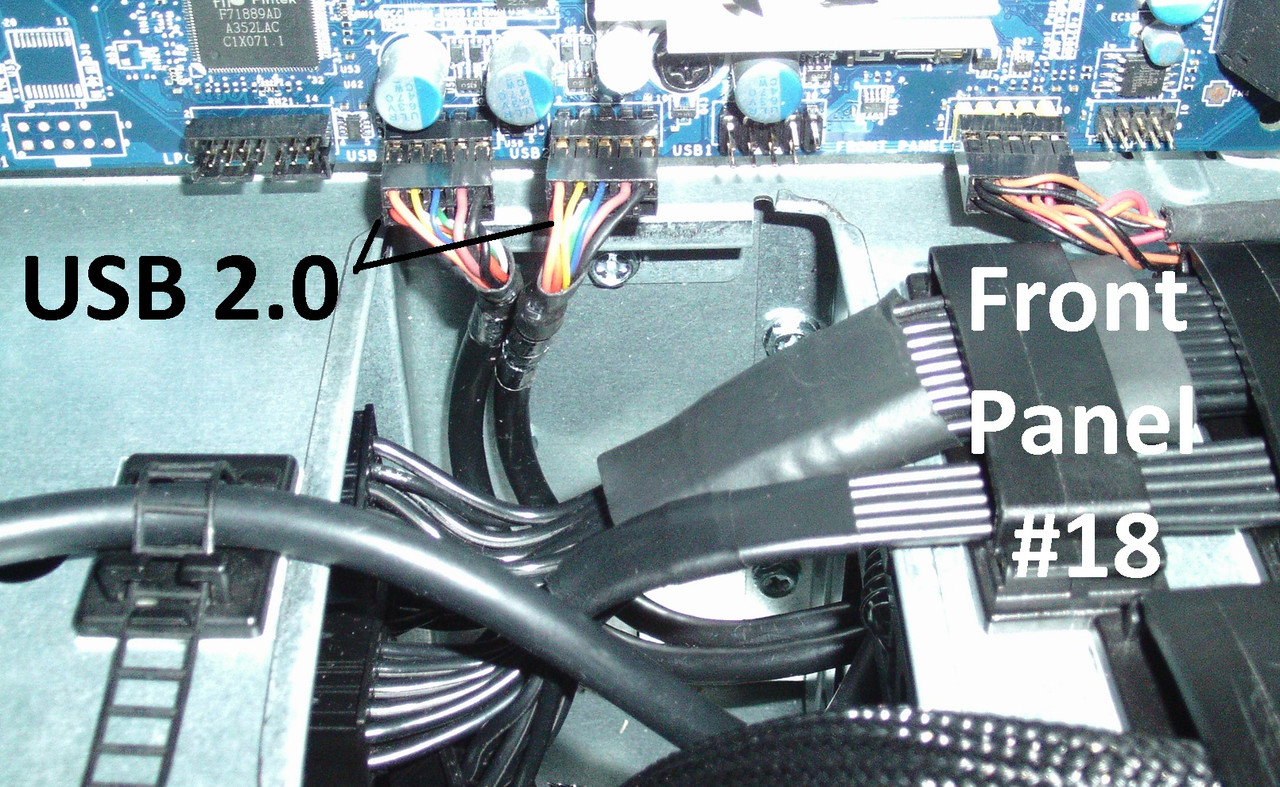
Make sure USB2.0 & Front Panel 5x5 are all connected
Good time to post photo of the motherboard & the connections you made
(edited)
0
0
Posted July 26th, 2024 21:30
Out of curiosity: what is the brown square thing in the top right corner of the original picture? It looks like a bag of sand?

0
0
Posted July 26th, 2024 21:37
Ah ok, that might be an issue if it's that dusty and it was disturbed and then powered on.
0
0
Posted July 27th, 2024 11:40
From several photo-diagrams in this thread now, see motherboard schematic: Audio to #23, USB2.0 pair to 19 20 or 21, Front Panel to 18 ... CPU 8pin to 4, 24pin to 9 ... ... ... then other end of MIO USB 5x5 to MIO board #25

redxps630
11 Legend
•
16435 Posts
•
83188 Points
0
0
Posted July 26th, 2024 12:42
Is it Aurora R1 or 2-4 you have?
(edited)