
UNSOLVED
PowerEdge R250 CPU clock lock at .20 GHz
I have a Dell PowerEdge R250 running Windows Server 2022. Anytime there is a power outage and the server switches to the battery backup unit the cpu clocks on the server locks to 0.20 Ghz and will not raise back up after power is restored. I tried a brand new battery backup unit thinking the current unit was getting weak but the issue persists.
I've updated the bios to 1.8.1, checked windows power config and set it to 100% min/max cpu state. Checked the bios for any power saving features and they were disabled.
(edited)
0
0
Posted March 20th, 2024 14:22
@DELL-Chris H
Not showing any errors in the logs. Also not seeing any cables labeled P3/MB. I checked all the connections to make sure the retention clips are in the correct direction locked to the notches.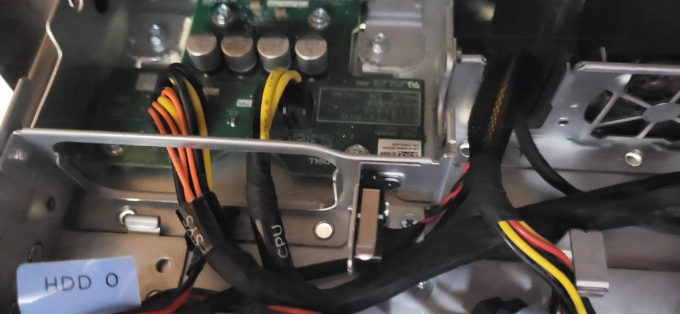

0
0
Posted March 20th, 2024 14:24
@DELL-Chris H
Also a simple restart doesn't resolve the issue. The server has to be completely powered down and powered back up for the cpu clock speeds to go back to normal. Not sure if that helps narrow anything down.(edited)
0
0
Posted March 20th, 2024 14:37
It should be located as seen below.
When you locate it, can you verify it is facing the correct way, that there isn't any damage or bent pins, and also try reseating the connection?
Lastly, is the server completely up to date, I know you stated the BIOS is, but is the rest of the server?
DELL-Chris H
Social Media and Communities Professional
Dell Technologies | Enterprise Support Services
#IWork4Dell
Did I answer your query? Please click on ‘Mark as Accepted Answer’. ‘Thumbs up’ the posts you like!0
0
Posted March 20th, 2024 14:50
@DELL-Chris H
ok I will look for those connections. Windows server 2022 is up to date, and I just seen there was another BIOS update released on the 13th of this month so I will update that also. Is there any other updated I should be looking for?0
0
Posted March 20th, 2024 15:01
I would also consider updating CPLD, iDrac, raid controller, etc. The iDrac in particular, as it cant be too far from the BIOS or you can start having communication issues witht he two.
DELL-Chris H
Social Media and Communities Professional
Dell Technologies | Enterprise Support Services
#IWork4Dell
Did I answer your query? Please click on ‘Mark as Accepted Answer’. ‘Thumbs up’ the posts you like!0
0
Posted March 20th, 2024 16:03
Ok found the connectors and they are connected correctly. Pins looked fine. Updated BIOS to 1.9.1, updated iDrac to 7.10.30.00, CPLD and raid controller were up to date. Simulated a power outage by unplugging the battery backup unit. Server stayed powered, but cpu clocks again locked at .20 GHz.
0
0
Posted March 20th, 2024 16:27
Thank you for confirming that for me. The next thing I would suggest testing would be if the issue occurs outside the OS. I suggest you download the Dell Support Live image here. You will then want to boot to that and repeat the test, then let me know what you see.
DELL-Chris H
Social Media and Communities Professional
Dell Technologies | Enterprise Support Services
#IWork4Dell
Did I answer your query? Please click on ‘Mark as Accepted Answer’. ‘Thumbs up’ the posts you like!0
0
Posted March 21st, 2024 19:30
Ok I got a chance to do some more testing on it today. I haven't tried the dell OS iso but I did boot windows server 2022 into safe mode and simulated the power outage. In safe mode the CPU clocks do not down clock and it acts perfectly normal.
(edited)
0
0
Posted March 21st, 2024 19:34
Glad to hear you isolated it. What I would look at is the system profile setting, specifically if it is set to OS managed, and not max performance.
DELL-Chris H
Social Media and Communities Professional
Dell Technologies | Enterprise Support Services
#IWork4Dell
Did I answer your query? Please click on ‘Mark as Accepted Answer’. ‘Thumbs up’ the posts you like!

DELL-Chris H
7 Practitioner
•
9682 Posts
•
48046 Points
0
0
Posted March 18th, 2024 17:18
CwH4225,
Would you confirm if you are seeing any errors in the logs, and if so what are the specific errors?
Also, would you power down the server, remove the power cables, then hold the power button down to drain the flea power. Once that is done would you check the power supply cables, specifically the one labeled P3/MB and verify it is connected correctly, with the retention clip facing inwards and locked to the plastic notch sticking out? If it isn't, would you reverse that connection and then retest it?
Let me know what you see and if this helps.
DELL-Chris H
Social Media and Communities Professional
Dell Technologies | Enterprise Support Services
#IWork4Dell
Did I answer your query? Please click on ‘Mark as Accepted Answer’. ‘Thumbs up’ the posts you like!