
UNSOLVED
ONIE update destroys IPMI - FAN speed control error + serial console dead (S5212F-ON)
Dear Dell Network team,
we have one S5212F-ON in lab, so we don't destroy our production.
1, around February 2026 we've updated run update: onie-update-full-x86_64-dellemc_s5200_c3538-r0.3.40.5.1-35.bin
So far so good.
2, Now the sad part - in November 2026 some unknown entity (DellGineer / AI Dell Agent) released ONIE 3.40.5.1-26.1
(why 26.1 when previously we've got -35?)
After proceeding with steps defined in RelNotes -> "Firmware update staging from NOS",
our switch did not come up after even 35-40 minutes of waiting for it.
We decided to check serial console whats going on - there was failed process writing in fast pace message that asks for confirmation of some firmware update.
Here we waited another ~15 minutes if it moves further - which does not.
So we decided to power off switch, wait 1 minute, and power it up again.
Result is following after booting up S5200 with this "creation from DELL":
1, FANs are running full speed - what an engineering !
2, BMC is malfunctional - see 5th and 7th line at the bottom of this serial console boot output:
11, 32, 11, 32, 15, 00068001, 19, 00068000,


BIOS Boot Selector for S5200
Version 3.40.0.9-21


POST Configuration
  CPU Signature 506F1
  CPU FamilyID=6, Model=5F, SteppingId=1, Processor=0
  Microcode Revision 3E
  Platform ID: 0x0
  PMG_CST_CFG_CTL: 0x37
  Misc EN: 0x4000840089
  Gen PM ConA: 0xA0A00200
  Therm Status: 0x8000000
  POST Control=0xEA000301, Status=0xE604DF20

BIOS initializations...

CPGC Memtest Channel 0 ...................... PASS

POST:
  RTC Battery OK at last cold boot
  RTC date 11/8/2026 17:04:55

POST SPD test ............................... PASS

POST Lower DRAM Memory test ............. START
POST ECC Test ............................... PASS

....  Perf cnt (curr,fixed): 0x6EEDAC460,0xCFFDA30AC

POST Lower DRAM Memory test ................. PASS
POST Lower DRAM ECC check ................... PASS
37, 00068003, 4F, 3B, 00068002, 60, DXE_CORE_STARTED (03041000)
61, ERROR: Class:0; Subclass:20000; Operation: 1002
9A, 02020000, 62, 78, 68, 69, 00068005, 6A, 70, 00068008, 71, 79, 03058001, 90,
DXE_BDS_STARTED (03041001), 92,
PciBusStart(02010000): 94, 02011000, 94, 02011000, 94, 02011000, 94, 02011000, 95, 96, 9▒91, 92,
PciBusStart(02010000): 97,
98, 98, 9D, 9D, 02020004, 9C, 9C, 02020003, 92, 92,
PciBusStart(02010000): A0, A0,
AhciBusStart (02080000), A2, A2, AHCI port 4 reset 1 pass
SATA ConfigureDevice Port 4: Device M.2 (S42) 3IE4 Pass
99, 99,

AMI Code Label: 0ACHI055
RC  Version   : 0.149.4.66
SPS Version   : 0B:4.0.4.830

FPGA: 3.4; CPLD: 0.9
Reset Cause = 41

Current BOOT from Primary BIOS

DxE POST

POST Upper DRAM Memory test
  Short memory cell test
....
POST Upper DRAM Memory test ................. PASS
Boot Device Access .......................... PASS
POST PCI test ............................... PASS
          -------> POST BMC Interface test ........................... FAIL        <---------
POST NVRAM check ............................ PASS
          -------> POST overall test results ......................... FAIL           <---------

NVRAM: 20 DF 04 E6   01 03 00 EA

Version 2.19.1266. Copyright (C) 2025 American Megatrends, Inc.
BIOS Date: 02/25/2025 18:28:39 Ver: 0ACHI055
Press <DEL> or <F2> to enter setup.
Our question to Dell Engineer / Dell AI Agent who decided to release this damaging update:
- Any possibility to "force" reflash of BMC if /dev/ipmi device in ONIE is unavailable ? E.g. via Yafuflash ?
- After opening physically the switch we've found there is BMC board that has 4 pins that are most probably JTAG or UART
- is there a procedure how to recover BMC firmware?

- is there a procedure how to recover BMC firmware?
(edited)


0
0
Posted November 9th, 2026 10:49
Thanks a lot for taking care.
Here is the screenshot from serial console:

PS: Recovery procedure can't be provided because there isn't one, or because despite existence of this procedure DELL don't want to provide it? (if it can't be shared publicly you can msg me privately).
If those pins are UART and there is a chance that BMC accepts something via e.g. YModem/Zmodem than I'll be more than happy to flash it this way.
(edited)
2
0
Posted November 9th, 2026 13:07
Regards,
DELL-Bridjet V
Social Media and Communities Professional
Dell Technologies | Enterprise Support Services
#IWork4Dell
Was your query answered? Please click Thumbs Up on the post that helped to Mark it as Accepted Answer!
2
0
Posted November 9th, 2026 14:22
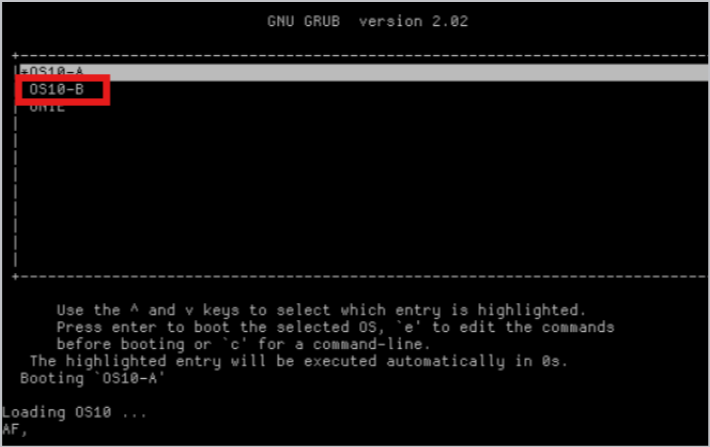
Dear @DELL-Bridjet V ,
thanks again for taking care.
I've tried both OS10-A and OS10-B, and both versions boot OK.
What doesn't work :
- IPMI / bmc board
- FANs are super-loud
Is there any procedure how to reflash BMC board after applying DELL update ONIE 3.40.5.1‑26.1, which results in malfunctional BMC / ipmi controller board ?!?
4
0
Posted November 10th, 2026 05:29
Hi @Jans259,
Unfortunately, I couldn’t locate any instructions for reflashing the BMC board.
If you still have the 0.3.40.5.1‑35 file on hand, you may try flashing it again. Since this file has been removed from the support website, I’m unable to provide it myself.
Is the switch still covered by warranty? If it is, you may need to reach out to our support team for an alternative solution.
Regards,
DELL-Bridjet V
Social Media and Communities Professional
Dell Technologies | Enterprise Support Services
#IWork4Dell
Was your query answered? Please click Thumbs Up on the post that helped to Mark it as Accepted Answer!
1
0
Posted November 10th, 2026 11:47
Dear @DELL-Bridjet V / Dell engineers + Dell management,
>>Is the switch still covered by warranty? If it is, you may need to reach out to our support team for an alternative solution.
Our LAB device is not covered by warranty/support anymore.
So DELL provided earlier this year update 0.3.40.5.1‑35, which has been later in October 2026 replaced with 0.3.40.5.1‑26.1.
DELL's new update will screw unknown percentage of switches in production and you're telling customers to "contact support"? In 2026? No one responsible? Please do not blame AI / Agents - there should be somebody "who decided" !
Isn't it more wise and smart not to cause problems at customer sites?
Is this the way DELL want's to build their reputation on?
To all DELL customers who own S5200F-ON series ( S5212F-ON, S5224F-ON, S5232F-ON, S5248F-ON, S5296F-ON) - this one update made by DELL engineers will most probably screw your device - please do not apply it.
PS: we renamed our LAB device from S5212F-ON -> S5212F-OFF as your latest FW update made BMC/IPMI board dead and FAN's are revving like crazy.
PS2: S5200 series engineers will definitely have some instruction how to bring this BMC board back to life.
There is a reason why there are those 4 PINS - which are UART most probably, as there is some message periodically received but 115200 is improper baud-rate and output is unreadable/garbled. We just hope we will find baud rate by oscilloscope and will see messages made by U-BOOT to recover firmware via UART upload
3
0
Posted November 11th, 2026 09:38
Hi @Jans259,
I did not mean to upset you; I was only asking whether your device is still under warranty so I can provide immediate assistance, not for any other reason. I can look into the reported issue and post the available solutions in the forum.
I’ve also sent you a message via a private conversation—please reply there.
Regards,
DELL-Bridjet V
Social Media and Communities Professional
Dell Technologies | Enterprise Support Services
#IWork4Dell
Was your query answered? Please click Thumbs Up on the post that helped to Mark it as Accepted Answer!

DELL-Bridjet V
Moderator
•
120 Posts
•
344 Points
4
0
Posted November 9th, 2026 05:32
Hi @Jans259,
Can you let me know what appears on the screen immediately after the following lines?
When you press F2:
If the BIOS lets you select an ONIE entry, you should be able to use the ONIE recovery path. If that option is not present, the next step would be to open an RMA case.
I’m not able to provide guidance on recovering the BMC firmware through the four‑pin header on the BMC board.
For reference, the earlier package onie-update‑full‑x86_64‑dellemc_s5200_c3538‑r0.3.40.5.1‑35.bin was withdrawn (likely due to known issues), and the current release is ONIE 3.40.5.1‑26.1, which triggered the notification you received from Dell AI.
Regards,
DELL-Bridjet V
Social Media and Communities Professional
Dell Technologies | Enterprise Support Services
#IWork4Dell
Was your query answered? Please click Thumbs Up on the post that helped to Mark it as Accepted Answer!