
UNSOLVED
Random crashes in NVMEHostmetadata.exe (Dell software)
NVMEHostmetadata.exe randomly crashes, as I'm a software developer, I tried to enter a debug session on the last crash and I found that it crashed because it called memset Microsoft C/C++ function in vcruntime140.dll with a null pointer as dest (first) parameter, c filler value being 0 and count being 128 bytes. As I don't have symbol info for your NVMEHostmetatdata.exe, I was only able to return from memset to look at the assembly that called this function with bad pointer within your code and I was able to copy the disassembly (with some comments), you should pass that as a bug report to the developpers :
; The beginning of the function within NVMEHostmetadata.exe that made memset crash
009D71B0 push ebp
009D71B1 mov ebp,esp
009D71B3 push 0FFFFFFFFh
009D71B5 push 9DAC80h
009D71BA mov eax,dword ptr fs:[00000000h]
009D71C0 push eax
009D71C1 sub esp,0FB4h
009D71C7 mov eax,dword ptr ds:[009DF020h]
009D71CC xor eax,ebp
009D71CE mov dword ptr [ebp-10h],eax
009D71D1 push ebx
009D71D2 push esi
009D71D3 push edi
009D71D4 push eax
009D71D5 lea eax,[ebp-0Ch]
009D71D8 mov dword ptr fs:[00000000h],eax
009D71DE mov ecx,dword ptr [ebp+14h]
009D71E1 mov eax,dword ptr [ebp+8]
009D71E4 mov edi,dword ptr [ebp+18h]
009D71E7 push 0
009D71E9 mov dword ptr [ebp-0FBCh],ecx
009D71EF lea ecx,[ebp-0F94h]
009D71F5 push ecx
009D71F6 push 8
009D71F8 lea ecx,[ebp-0F90h]
009D71FE mov dword ptr [ebp-0FC0h],edi
009D7204 push ecx
009D7205 push 0
009D7207 push 0
009D7209 push 41018h
009D720E push eax
009D720F mov dword ptr [ebp-0F94h],0
009D7219 call dword ptr ds:[9DB034h]
009D721F test eax,eax
009D7221 je 009D74C6
009D7227 push 124h
009D722C call 009D9CFD
009D7231 add esp,4
009D7234 mov ebx,eax
009D7236 push 124h
009D723B push 0
009D723D push ebx
009D723E call 009DA6BD
009D7243 mov esi,dword ptr ds:[9DF4DCh] ; null pointer that crashed memset below is a global variable
009D7249 add esp,0Ch
009D724C push 80h ; the memset count parameter value (128 bytes)
009D7251 push 0 ; the memset c parameter value
009D7253 push esi ; the null pointer that made memset crash!
009D7254 call 009DA6BD ; the called memset that crashed
009D7259 mov eax,7Ah ; ... end of function too long to copy here
0
1
Posted May 15th, 2024 06:13
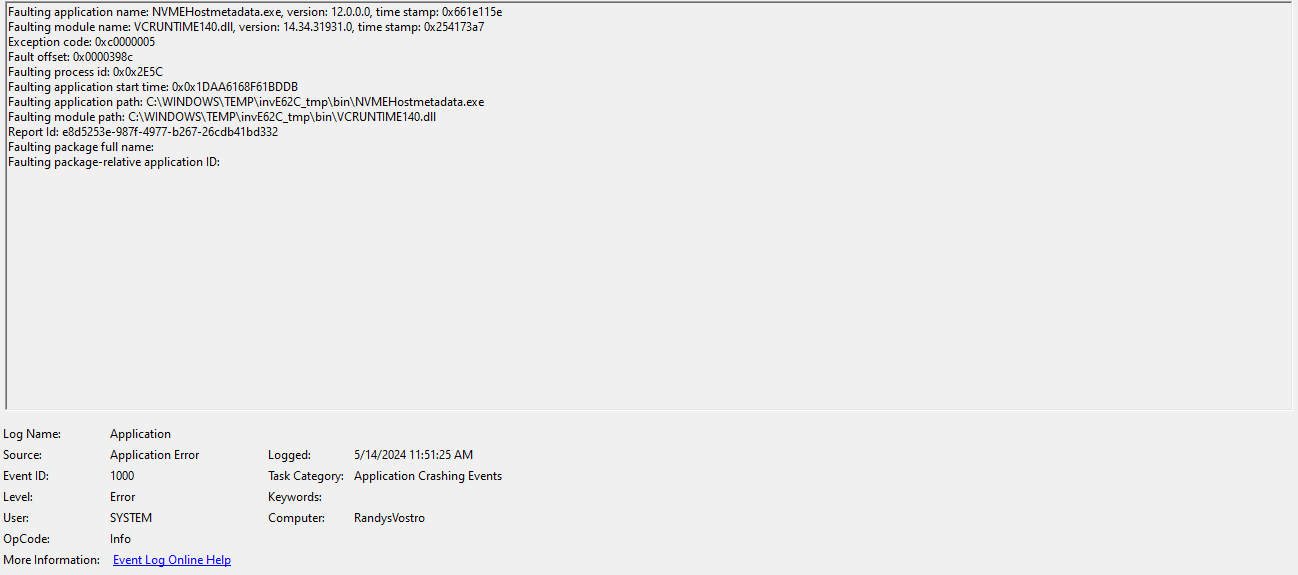 This is happening multiple times per day on multiple systems in my org.
(edited)
0
0
Posted May 15th, 2024 19:53
Same -- on a brand new Latitude 3540. Already ran SupportAssist to update bios and drivers and whatnot, still getting that exact error.0
0
Posted May 16th, 2024 00:54
For me it is new Vostro 3530s with Precision 3591s and a G16. All I7 or I9s. All experiencing frequent bluescreen crashes despite no errors found in extended EPSA and several OSRI.(edited)
0
0
Posted May 16th, 2024 16:09
We purchased 6 DELL OptiPlex Micro 7010's. 4 of them are doing this almost daily and some are doing it several times per day. All of them are using BIOS 1.11-1.13 and are all randomly booting to recovery mode. Two are using BIOS 1.9.x and are not experiencing this issue. You can't roll back after 1.11 or greater so I'm not sure if the BIOS update is the cause of this issue but we sure need a fix for this.0
0
Posted May 16th, 2024 19:23
Seeing same issue with two BRAND NEW SFF 7010's and bios 1.13.1. The faults are happening several times daily, and at least once a day the systems randomly boot to recovery mode.
SourceName : Application Error
Message : Faulting application name: NVMEHostmetadata.exe, version: 12.0.0.0, time stamp: 0x661e115e
Faulting module name: VCRUNTIME140.dll, version: 14.34.31931.0, time stamp: 0x254173a7
Exception code: 0xc0000005
Fault offset: 0x0000398c
Faulting process id: 0x0x950
Faulting application start time: 0x0x1DAA72623780550
Faulting application path: C:\Windows\TEMP\invE871_tmp\bin\NVMEHostmetadata.exe
Faulting module path: C:\Windows\TEMP\invE871_tmp\bin\VCRUNTIME140.dll
Report Id: 89fc0d42-4905-4626-b384-18e1e9d0e5cf
Faulting package full name:
Faulting package-relative application ID:(edited)
0
0
Posted May 17th, 2024 22:11
Thanks everyone for sharing this, I have shared with team, but can you let us know if this suggestion (1st reply) on Microsoft forums helps at all?
(edited)
Brad L (retired)0
0
Posted June 3rd, 2024 21:57
Anyone have any updates on how to resolve this issue?
0
0
Posted February 10th, 2025 14:48
Did anyone find a fix for this other than the only hit on a google search? The faulting application for multiple computers in our company appear to be the Dell Update Service.
0
0
Posted February 10th, 2025 14:57
@Agion42 Since the image didn't post, here's the error.
Faulting application name: NVMEHostmetadata.exe, version: 12.8.0.11, time stamp: 0x679b728b
Faulting module name: VCRUNTIME140.dll, version: 14.34.31931.0, time stamp: 0x254173a7
Exception code: 0xc0000005
Fault offset: 0x0000398c
Faulting process id: 0x0x311C
Faulting application start time: 0x0x1DB7BBE61F6EA64
Faulting application path: C:\Program Files (x86)\Dell\UpdateService\Service\InvColPC\bin\NVMEHostmetadata.exe
Faulting module path: C:\Program Files (x86)\Dell\UpdateService\Service\InvColPC\bin\VCRUNTIME140.dll
Report Id: 19d4f77b-fb9a-4903-a70b-7babfa277cfe
Faulting package full name:
Faulting package-relative application ID:

Brad L (retired)
11 Legend
•
2650 Posts
0
0
Posted May 14th, 2024 14:41
Can anyone with this issue please share steps to reproduce this? And also, please share a screenshot? The team would like to look into this further.
Brad L (retired)