
Solved!
Go to SolutionPowerEdge T140 Bios 2.19 issue
Hi
just a little warning for everybody having a T140 with an additonal PCIe graphicscard (AMD RX6500XT)
After Upgrading to BIOS 2.19 the T140 stopped booting when my LG 29 in Monitor was connected via Displayport.
In the iDRAC it was just mentioned that the boot process was stopped from BIOS.
After connecting a monitor to the onboard connector i captured the picture below.
Connecting via HDMI made him boot again.
Switching back to 2.18 made this issue disappear.
Yours

(edited)
0
0
Posted July 28th, 2025 20:41
Hello,
I glad you were able to regain functionality from rolling back the BIOS update.
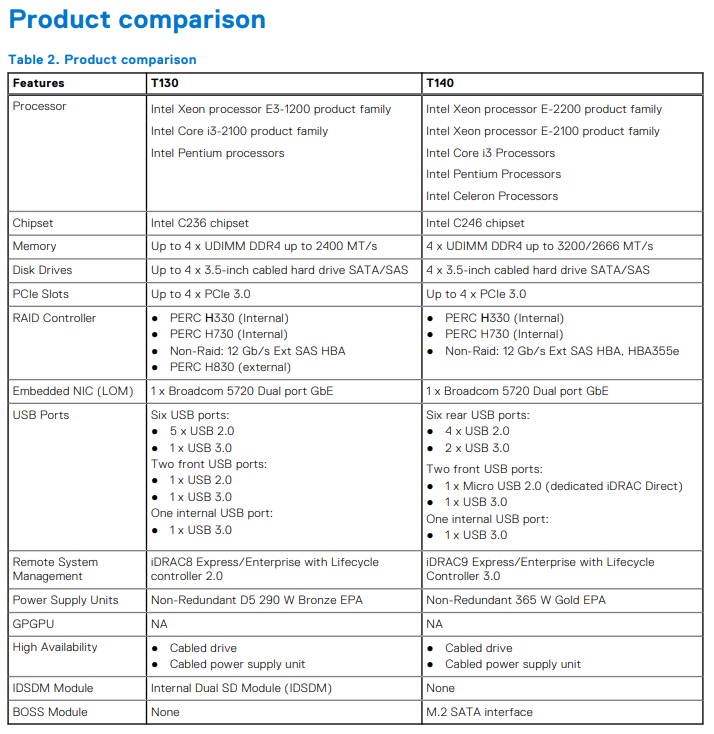
I will note that Dell has not validated a GPU on the T140 but I'm glad you posted your experience in case someone else is using a GPU.
Page 71 - The PowerEdge T140 system does not support GPU…
Spec sheet:
DELL-Charles R
Social Media and Communities Professional
Dell Technologies | Enterprise Support Services
#IWork4Dell
Did I answer your query? Please click on ‘Accept as Solution’. ‘Thumbs up’ the posts you like!0
0
Posted July 29th, 2025 17:18
Hi
thanks for pointing that out. But doesnt NA mean NotAvaible and not NP == Not Possible :-) .
I didnt buy the machine with intention to add a GPU.
It is even needed to log into the idrac via ssh and issue the following commands to reduce fan speed.
(Just in case anybody also wants to try ;-) )
-----
racadm>>racadm get system.PCIeSlotLFM.2.3rdPartyCard
[Key=system.Embedded.1#PCIeSlotLFM.2]
3rdPartyCard=Yes
racadm>>racadm set system.PCIeSlotLFM.2.LFMMode 1
[Key=system.Embedded.1#PCIeSlotLFM.2]
Object value modified successfully
racadm>>racadm get system.PCIeSlotLFM.2.LFMMode
[Key=system.Embedded.1#PCIeSlotLFM.2]
LFMMode=Disabled
racadm>>-----
Thx

DELL-Charles R
Moderator
•
4730 Posts
•
25476 Points
0
1
Posted July 29th, 2025 17:23
Hello,
NA = Not Applicable … but you probably knew that.
I'm glad to see you got a GPU running. Someone else may want to try it and it may be helpful.
DELL-Charles R
Social Media and Communities Professional
Dell Technologies | Enterprise Support Services
#IWork4Dell
Did I answer your query? Please click on ‘Accept as Solution’. ‘Thumbs up’ the posts you like!