
UNSOLVED
N
needhelp1923
1 Rookie
•
14 Posts
•
29 Points
0
558
July 27th, 2026 17:32
XPS 8940, wIll not power on, help!
Need help desperately....everything was perfectly fine. 2 mornings ago, I came out and the white led of the power button was still lit up. But, no power to peripherals, would not wake up. I then realized the fans were not running. Looked at back, and the green LED of the PSU was out. Ordered and installed a new 500W PSU. Lights up green, LED stays on. But the computer will not turn on. Push power button and nothing. I have removed the CMOS battery, held down the power button, removed the RAM, all that I can think of. There is no BIST button for the 8940. Does anyone have suggestions as to something I may have missed? There were no power interruptions, surges, etc. I figured the PSU just died. I bought this in 2021 in November. Just is odd as the old PSU when I plug it in just on its own, it lights up green, then dies after 3 seconds. Now, though, the new PSU is lit up, but nothing is happening when pushing the power button. WIll post this to Reddit page as well. Please, if someone has ideas.....thanks.
(edited)
3
0
Posted July 28th, 2026 08:02
Some useful tips here to help you:
1,How to test one power supply alone to check if it died or work good:
https://www.365powersupply.com/how-to-test-one-power-supply-alone-to-check-if-its-good-or-bad/2, How to use your dell service tag to check which part died:
https://www.dell.com/support/contractservices/en-us3, Try unplug power button cable and jump start power switch pins on motherboard,if nothing happens could be a bad motherboard.
And Due to your description, motherboard may be the problem.
2
0
Posted July 28th, 2026 14:41
@ILOVEDELLPC hi, thank you...how do you do that jump start power switch thing? i have no idea about this stuff, so thank you for your help. it looks like where the power switch attaches to the board, it is impossible to get to as well. i tried the service tag but dell said my warranty expired 2022. Kinda terrible product....bought at end of 2021, not even 5 years, after paying 1400.00 for it. No more Dell for me!
(edited)
1
0
Posted July 28th, 2026 16:01
You can unplug the power button cable from motherboard and use a flat blade screw driver to short power sw + and Gnd pins. Pinout
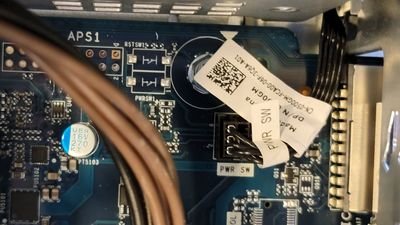
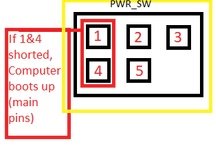
This is to rule out a defective power button.
(edited)
2
0
Posted July 28th, 2026 19:10
@redxps630 @ILOVEDELLPC thanks so much, that was extremely helpful. thanks to the help from the two of you I was able to test both the power button and the psus I have. Both PSUs powered on and the fans ran. So I then did the jumping of the power switch, trying both PSUs I have on hand. Nothing. Fans did not run, nothing happened. So does this mean that my MB is just fried? What could have caused this? I have to buy a new machine now....I want to keep all my current drives so i do not have to start all over from scratch. So thinking of buying another 8940 chassis with MB, i7 installed. However, just nervous that this could happen again. Is the 8940 board just weak or something? We had no power surges, nothing. Just came out in the morning and it was dead. Should I go for something else instead? Very wary of buying a new machine now for over 1.5K!! Thanks
3
0
Posted July 28th, 2026 19:29
Have you tried replacing CMOs battery with a new battery?
connect the power switch cable to motherboard again. Press the button. Does it light up with any color at all?
if no light at all and computer looks dead in the water with absolutely no sign of power, not a single led lit up, consider replacing the motherboard. You don’t need to replace cpu and ram.
3
0
Posted July 28th, 2026 19:57
@redxps630 hi, yep, one of the first things I did was put in a new one. I just reconnected the power button, tried both PSUs and nothing. no led on the power button, nothing anywhere. so my question remains....is it worth replacing with the same 8940 board or should I buy something new....or is there another board out there that might be a better option that will fit this chassis? edit...looks like ONLY that board will fit. So...is it worth doing another, or should I try and buy something new? I just do not know what killed the board. There was no indicators of a fault, nothing. thanks
(edited)
2
0
Posted July 28th, 2026 22:09
A new replacement board is about $160. I would consider if there is 60 day warranty and return is accepted.
No other board would fit the 8940 case.8940 cpu is Intel 10th gen already getting old.
You have used this 8940 for 5 years which is not very long nor very short. Motherboard can go bad unexpectedly although not very often.
(edited)
3
0
Posted July 29th, 2026 00:01
@redxps630 thanks, I ended up getting one still sealed for 130 bucks shipped. I have invested some RAM, other items, and I have an NVIDIA GEFORCE graphics card that works with it. I am wondering, though...do you know if I could upgrade the CPU on the board? The new board does not come with the CPU, so was wondering if maybe I buy an upgrade now. I also upgraded the PSU to 500w.
5
0
Posted July 29th, 2026 01:09
there is not much difference between intel 10th and 11th gen cpu for XPS 8940.
If you currently have an i5 processor can consider upgrade to i7
If you want 11th gen cpu support, better get the 8940 motherboard version of the later release and not the first release (kv3rp).
some user reported kv3rp board does not post smoothly w 11th gen cpu.
Motherboards =
KV3RP Foxconn 02012PQ00-600-G, Released July 9, 2020
2W4W1 Foxconn 02012TA00-600-G, Released December 1, 2020, Brazil only
F1H92 Foxconn 02012YJ00-600-G, Released March 15, 2021, Brazil only
427JK Foxconn 02012VY00-600-G, Released March 15, 2021
K3CM7 Foxconn ??, Released July 14, 2021

redxps630
11 Legend
•
16435 Posts
•
83188 Points
3
0
Posted July 27th, 2026 18:10
Try unplug power button cable and jump start power switch pins on motherboard
if nothing happens could be a bad motherboard if you have replaced with new psu, new is battery and done RTC reset.
https://www.dell.com/community/en/conversations/xps-desktops/xps-8940-power-switch-pinout/647f90d2f4ccf8a8de2288c8
(edited)