Solved!
Go to SolutionBluetooth not working on Windows 10 for Inspiron N5010
Previously on Windows 7 the Bluetooth worked fine, but as I updated my Windows 10 from Windows 7 there is no option or not a single hint of Bluetooth in my inspiron N5010. Please provide me the link of compatible driver for this.
I have downloaded the Bluetooth driver for this laptop from dell drivers and run it as compatible for Windows 7, but it also didn't work.
58549
0
Posted July 31st, 2015 09:00
Hey! After I upgrade to windows 10 by bluetooth adapted seemed to disappear too. What I did to solve it was - disable internal bluetooth in BIOS, restart, re-enable it. Then it appeared in device manager and I was able to install whatever driver I want.
Though, now my bluetooth is disconnecting at random for no obvious reason.. trying to figure this one out.
58549
1
Posted August 1st, 2015 11:00
Hey! After I upgrade to windows 10 by bluetooth adapted seemed to disappear too. What I did to solve it was - disable internal bluetooth in BIOS, restart, re-enable it. Then it appeared in device manager and I was able to install whatever driver I want.
Though, now my bluetooth is disconnecting at random for no obvious reason.. trying to figure this one out.
How to disable internal bluetooth in BIOS?
58549
2
Posted August 1st, 2015 11:00
Try to use bluetooth driver from Lenovo http://download.lenovo.com/ibmdl/pub/pc/pccbbs/mobiles/h0wz03ww.exe or use XP driver R197652.
Hope this helps!
It says remove the already installed bluetooth device, how can I remove it if i don't know where it is? And my laptop is of Dell, so would lenovo's driver work on Dell?
59275
1
Posted August 4th, 2015 23:00
I have exactly the same problem dell must provide the new driver a.s.a.p
59274
0
Posted August 5th, 2015 11:00
I have a similar issue with the insperon 7548 and windows 10
Tried to install several drivers with no luck.
The intel driver update software reports and incorrect driver version but nothing on the intel or dell driver offering seem to work.59274
0
Posted August 9th, 2015 06:00
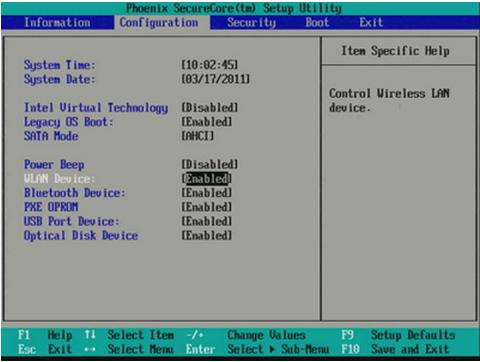
Well, right when the computer starts up displaying the "Dell" logo, press F2 (or del or something, I think it varies from computer to computer) to enter BIOS. Then just search it for Bluetooth option. Disable, save, restart, enable. Here is a picture I just pulled from the web to ilustrate rougly what to expect in the BIOS. It can be a bit different from PC to PC.
Tried your method, but still my bluetooth is not working.
8257
0
Posted December 26th, 2015 18:00
I have still not figured this out. Please provide a simple fix.
8257
2
Posted July 9th, 2016 00:00
Hey guys watch this video it worked for my device www.youtube.com/watch
8257
0
Posted July 9th, 2016 00:00
Have u tried it 4 yourself?


KaktitsM
6 Posts
59334
0
Posted August 1st, 2015 11:00
Well, right when the computer starts up displaying the "Dell" logo, press F2 (or del or something, I think it varies from computer to computer) to enter BIOS. Then just search it for Bluetooth option. Disable, save, restart, enable. Here is a picture I just pulled from the web to ilustrate rougly what to expect in the BIOS. It can be a bit different from PC to PC.