
UNSOLVED
B
benvndcfb1e
1 Rookie
•
3 Posts
•
2 Points
0
265
August 19th, 2025 09:55
Dell suggested Drivers Incompatible
Hi Team,
I'm having a Dell Latitude 5530. Recently, after installing the new Video Driver via Dell Command Update, my external monitors became black.
I checked the installed version and the driver information here: Support for Latitude 5530 | Dell US
I found out that the driver was incompatible to my machine, can Dell remove this so I can keep updating my drivers via Dell Command Update?
<Private data removed from public view. DELL-Admin>
Thanh
(edited)
0
0
Posted August 20th, 2025 04:11
Hello @Florian555,
Yes, I tried a similar way.
Since this driver is a "Recommended" type only, I went to "Update Filter" --> "Importance" --> unticked both options "Recommended Updates" & "Optional Updates".
It works fine now.
The thing is I want to report to Dell as this is a problem where they suggest a driver which isn't compatible with my machine...
Thanh
0
0
Posted August 20th, 2025 08:49
Hey @benvndcfb1e,
I'm pretty sure the driver is compatible to your system. Its probably just the installation procedure causing the issue. Have you tried installing the driver manually without Dell Command | Update?
Downloadlink:
Intel Graphics/Arc Graphics Driver and Intel Graphics Software Application | Driver Details | Dell US0
0
Posted August 20th, 2025 10:25
Hi @Florian555,
No, I haven't tried it. Still, my colleagues have the same issue as mine.
After we installed it via Dell Command Update, we couldn't use external monitors at all, they all went black.
About the driver compatibility, here are my machine specs:

And here is the driver's info:

Thank you!
0
0
Posted August 20th, 2025 11:18
Hey @benvndcfb1e,
In my experience the webpage descriptions on the Dell driver packages are not 100% reliable.
If you unpack the Dell Update Package from the previously provided link you can find the drivers readme file (from Intel corp) in the subfolder "\16299\Drivers\6881" which lists the 11th and 12th Intel Core processor family as compatible.
Additionally the same driver version on the Intel page also lists 11th and 12th Gen Intel Core processors as compatible: Intel® Arc™ & Iris® Xe Graphics - Windows*
0
0
Posted October 27th, 2025 14:15
Hello,
It seems that we have the same problem since this week-end on different devices model (5330, 5340 and probably others).
Dell command update had install Intel graphic driver and since we had black screens for several seconds, problem with external screens...
And the graphic card change regularly from Intel Iris to Microsoft Basic Display Adapter. ARC drivers are suspected to be installed on incompatible PCs. But not sure.
0
0
Posted October 28th, 2025 15:19
We also continue to experience the issue. Turns out that our users appear to be impatient, not waiting for the graphics driver installation to complete, which can take 5-10 minutes to finish.
Windows event logs indicated that the computers were shutdown whilst the driver installation was being performed, leaving the systems with no intel graphics driver being installed.
It appears that while the installation is running, the graphics driver will be uninstalled first, resulting in "no video output on external monitor" or "low resolution video output on one external monitor" whilst the Dell Command | Update window is hidden for some reason. Users get impatient and reboot their system.
I've had 2 users that confirm to me that they performed a shutdown few minutes after the system started to have its video output changed.
My Latitude 5350 system had the same driver installed via Dell Command | Update with no issues, as I have just been patient enough for the driver installation to finish.
We've furthermore provided DCU and Windows Event Logs to Dell and Intel, which also confirmed that all affected systems had a shutdown initiated by the user while the GPU driver installation was being performed.
So why is this happening now and has not happend with previous Intel graphics driver versions? Dell support stated, that this Intel graphics driver installer, will uninstall a couple older graphics driver components which take more time for uninstallation. The more older Intel graphics driver versions were installed on this system in the past, the longer this uninstallation procedure will take in total.
There are no improvements planned on Dell side to prevent this.
Please let me know if you have a confirmed case where you are a 100% sure that the computer was not shutdown or rebooted whilst the driver installation was still running.
Under C:\ProgramData\Dell\UpdateService\Activity.log you will find the timestamp of the DCU intel graphics driver installation:
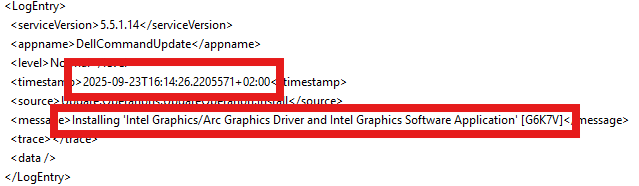
Now you can check if there was any shutdown performed in the Windows Eventlog (system). Event ID should be 1074. Example in my case @16:16:42 (2 Minutes after the graphics driver installation process started):
The process C:\Windows\System32\RuntimeBroker.exe (%computername%) has initiated the shutdown of computer %computername% on behalf of user domainname\username for the following reason: Other (unplanned)
Reason Code: 0x0
Shutdown Type: shutdown
Comment:0
0
Posted November 5th, 2025 11:06
Thanks for the detailed comment @Florian555 - That describes exactly what is happening in my organisation.
The main problem here is the end users. When an display update is triggered: their laptop screen will start flickering, connected monitors will disconnect. The end user's first response is to restart the PC. Causes a lot of headache for me when I have to reinstall display updates manually.
0
0
Posted November 5th, 2025 11:17
Thanks for your feedback.
In our side after several days it seems resolve.

Florian555
1 Rookie
•
23 Posts
•
11 Points
0
1
Posted August 19th, 2025 15:42
Hey benvndcfb1e,
I was running into the same issue with Intel Graphics driver version 32.0.101.6881 last Friday. I've noticed that the device manager is displaying the video adapter driver as "Microsoft Basic Display Adapter". After running Dell Command | Update again, it offered and performed the video driver installation once again and everything was back to normal afterwards.
Can you confirm whether or not another driver installation attempt will complete successfully?
Also to prevent DCU from installing any newer graphics drivers, you can open DCU settings, then "Update Filter" -> "Device Category", uncheck the "video" option and click ok.