
UNSOLVED
CPU Voltage Problems after Motherboard Replacement
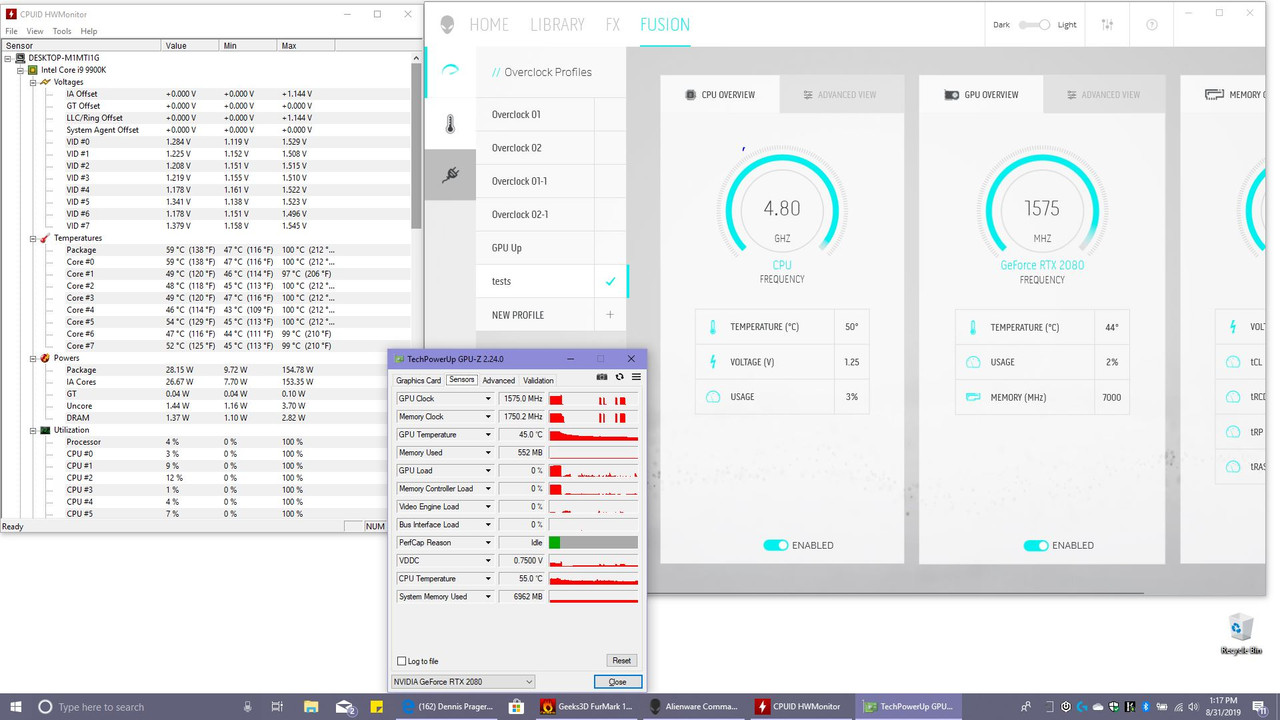
Hello fellow Area Fifty Oners :0). I'm possibly having issues with my laptop that maybe you guys can help me with. Ok so I have had this laptop for about a month now and in that short time I've had to get it serviced three times. Last one was because I was trying to upgrade to the latest version of bios and ended up bricking it. They replaced the motherboard with a new one yesterday and this is were my new troubles begin. I'm getting some weird vcore spikes that i can't explain. These can be seen in HWMonitor and in Alienware Command Center. It seems to run hotter than usual and I think its because of this strange vcore spikes. I've tried to manually set the vcore voltage within Alienware Command Center and I still get huge vcore spikes above what I set it to. Here are some pics showing the strange spikes (no overclocking was done). If you notice HWMonitor its shows some really broad voltages (min and max) well above threshold (manual or auto-managed by Alienware Command Center). Even just downloading a game from steam for example spikes the cpu temp to 80 to 100c. Any help would be much appreciated;)
I believe it has something to do with turning on certain cpu functions in bios (cstate, speedboost etc.) but Alienware locks out those cpu features within bios so the end user cannot access them. These features may not have been set correctly; or at all, on the replacement motherboard that was sent to me.
1321
0
Posted September 5th, 2019 00:00
I didn't have these issues before the motherboard was replaced. I'm pretty sure its something in bios that needs to be changed turned on this new motherboard. Seeing as dell locks out the cpu settings portion of bios, I can't do anything. Maybe Dell can take a look at it with their software that opens up the cpu settings in bios (pretty sure they have something like).
1319
0
Posted September 5th, 2019 00:00
Are you on a Alienware Area-51m laptop and do you have access to cpu settings in bios?
1304
0
Posted September 5th, 2019 10:00
Have you encountered any Throttling issues whilst the computer reaches those temperatures? Or has the computer shut down unexpectedly?
1251
0
Posted September 9th, 2019 15:00
We haven't heard from you in a while.
Have you gotten any other insight that might have resolved the issue?
1155
0
Posted September 17th, 2019 02:00
The issue persists. I talked to tech support about it around two weeks ago and previously before that around 3 weeks ago. The first guy (3 weeks ago or so) told me to send it in that the heatsink needed to be replaced that that was something only a dell tech can do and that the temperature should never reach 100c. He mentioned settings in bios for cpu that I can possibly change but then acknowledged that they might be locked out to the end user. I had to delay a week to send it in and so he told me to email him and or call back so that dell can send a box for me to send the laptop to Texas where the dell tech support was located.
A week later I called ready for the box to be sent out and this time around was told that I didn't need tech support that the computer was working just fine. I then asked him if he can remote view my session and I would be able to show him the temperatures and voltage spikes using HWmonitor and Alienware Command Center. He then verified that the voltages for the cpu were abnormal. We restarted the computer after turning off all startup programs and services that where not Microsoft. He then ran a stress test on the cpu and it was still running at 100c but the voltages seemed to stabilize some. He then disconnected saying voltage spikes was software related although he didn't say what software was causing this. He then helped me turn the services back on. I then followed the steps he did and also followed his instructions to reproduce the problem by turning the services back on. Sure enough the voltages were not stable. I told him this and he said that I would need to remove programs in order to troubleshoot. This was the exact same drive I had before the motherboard was swapped and everything worked fine before that; with the same programs installed and all.
Since then I have continued to have these problems and new ones. My computer has frozen on multiple occasions especially when its being stressed by an application or a game. I have had it have microstuttering all of a sudden at odd times. Video play back seems sluggish at times. All this even after reinstalling windows 10 and not installing any software except the Alienware software and a game to test on. The game runs super slow frame rate from 15 to 35 frames per second even after setting the game on low settings (the game Conan Exiles). Another game I tested Ark Survival Evolved will run ok and then when the system begins to be stressed a bit it runs around the same frame rates as above and random crashing. Both of these games ran just fine before the motherboard swap. My cpu runs super hot when downloading large files at high mbps rates. Mind you I had no such issues before the motherboard was replaced. Please help!

AvidAcer
1 Rookie
•
10 Posts
1328
0
Posted September 4th, 2019 23:00
I have the same problem on my i9 9900k I use afterburner and the cpu voltage just goes all over the place up down up and down. I notice when it spikes high the temperatures rise alot to. So I agree is most of the heat problem not found away to solve it yet tho